
[IAG] After the LAN port of IAG was modified, the DHCP address allocation problem still used the old network segment – customer environment problem
Problem Description
After the IAG modified the LAN port, the DHCP address allocation problem is still the old network segment
Process——
- Use the IAG device as a gateway and enable the DHCP function.
- Due to customer business needs, the LAN port address segment was changed (from 172.37.84.1 to 172.37.83.1), and the corresponding DHCP configuration was also modified.
- The address assigned to the PC is still the original network segment.
ifconfig/release; ifconfig/renew still fails to obtain the address again - Run ifconfig/all on the PC to check that the DHCP server address is 172.37.84.15
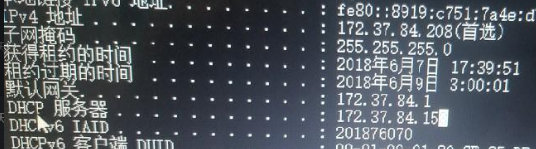
248185b19d7d317ded.png (150.81 KB)
Root cause
There are other devices or servers in the intranet that are configured with DHCP.
solution
Find the IP address 172.37.84.15 in the above picture and disable its DHCP function
Original Link
https://support.sangfor.com.cn/cases/list?product_id=22&type=1&category_id=5900&isOpen=true