
Indicator Light Description Each Product Line
Problem Description
Indicator Light Description Each Product Line
solution
Load balancing A**D Hardware Description**
Front of the device:

Back of the device:

Interface port light:
Link: Displays the Line connection status
Act: Display data traffic
HA indicator: Double-click deployment indicator
Even master: both are off; master-slave: master is off, and the standby is blinking
POWER: Device power indicator
STATUS: Hard disk indicator
Flashes when data is being read
ALARM: Equipment alarm indicator
Flashing means an error log is generated;
Constant indicating device Error
Back of the device:
Shut Down button: long press to Shut Down
Mute button: Press Mon to mute the device hardware
LocalNGAFHardware Description
Front:

back:

Interface port light:
Link: Displays the Line connection status
Act: Display data traffic
HA indicator: Double-click deployment indicator
Even master: both are off; master-slave: master is off, and the slave is flashing (specific information is subject to product line definition)
POWER: Device power indicator
STATUS: Hard disk indicator
Flashes when data is being read
ALARM: Equipment alarm indicator
Flashing means an error log is generated;
Constant indicating device Error
BYPASS: bypass function indicator
When a device Fault, Mon network cable connection is formed inside the device. The constant light indicates that the bypass function is enabled on the device.
Back of the device:
Shut Down button: long press to Shut Down
Mute button: Press Mon to mute the device hardware
IAGIAGHardware Description
Front:

back:

Interface port light:
Link: Displays the Line connection status
Act: Display data traffic
HA indicator: Double-click deployment indicator
Even master: both are off; master-slave: master is off, and the slave is flashing (specific information is subject to product line definition)
POWER: Device power indicator
STATUS: Hard disk indicator
Flashes when data is being read
ALARM: Equipment alarm indicator
Flashing means an error log is generated;
Constant indicating device Error
BYPASS: bypass function indicator
When a device Fault, Mon network cable connection is formed inside the device. The constant light indicates that the bypass function is enabled on the device.
Back of the device:
Shut Down button: long press to Shut Down
Mute button: Press Mon to mute the device hardware
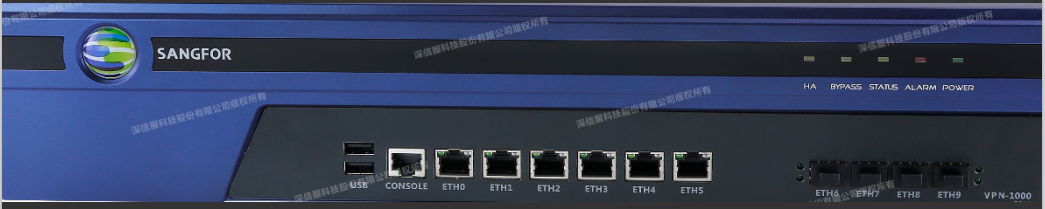
V**PN Hardware Description**
Front:
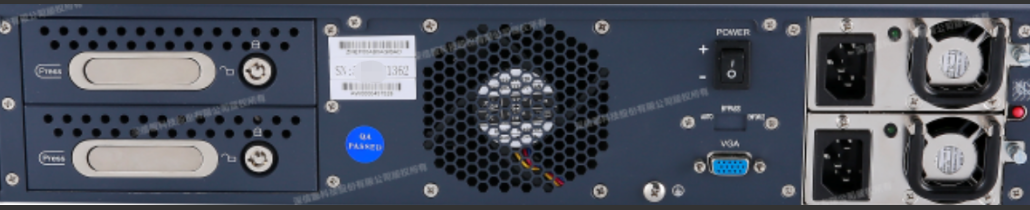
back:
Interface port light:
Link: Displays the Line connection status
Act: Display data traffic
POWER: Device power indicator
STATUS: Hard disk indicator
Flashes when data is being read
ALARM: Equipment alarm indicator
Flashing means an error log is generated;
Constant indicating device Error
BYPASS: bypass function indicator
When a device Fault, Mon network cable connection is formed inside the device. The constant light indicates that the bypass function is enabled on the device.
Back of the device:
Shut Down button: long press to Shut Down
Mute button: Press Mon to mute the device hardware
Original Link
https://support.sangfor.com.cn/cases/list?product_id=156&type=1&category_id=27442&isOpen=true