
[Hardware troubleshooting] After upgrading the HCI670 Version, the System repeatedly restarts Auto unlock after the system loading interface
Problem Description
After the thirdWedparty server upgrades to HCI670 Version, Auto unlock after repeatedly Restart in the System loading interface
solution
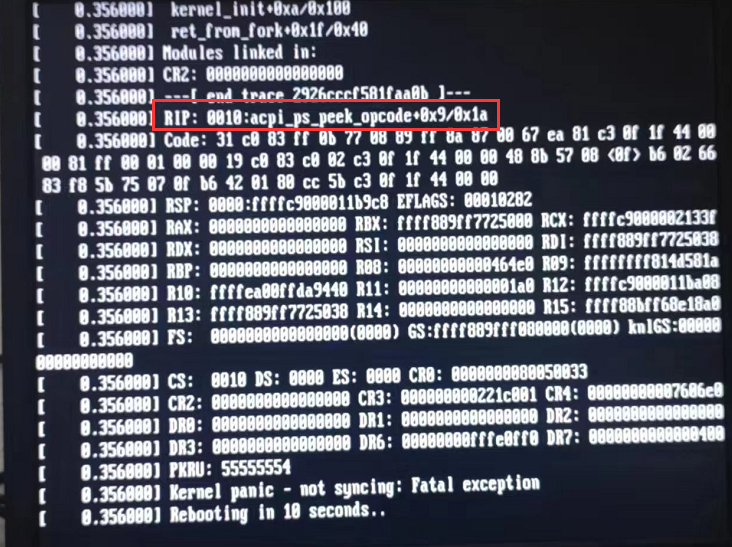
**Step One: **After upgrading the HCI670 Version, the device restarts Auto unlock after System loading interface. The same phenomenon occurs on multiple devices. Take Mon photo of the last screen before the Restart to see if RIP:0010:acpi_ps_speek_opcode is printed. If it is printed, proceed to step Tue. If None, enter IPMI View whether there is an Alerting event. If there is None Alerting, contact Software.
**Step Two: **Restart the device and enter BIOS (usually press the delete key, there is a key prompt on the LOGO interface), Advanced–>CPU Usage Configuration–>Advanced Power Management Configuration–>Power Technology Settings to "Custom".
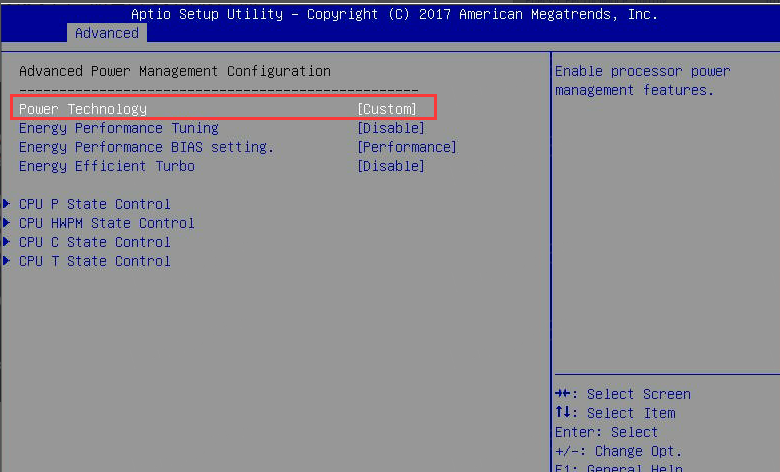
Step Three: Turn off Mode energy saving mode and process it according to Kb, link: https://support.sangfor.com.cn/cases/read?product_id=156&category_id=22804
After Close Mode energy saving mode, press the Save key to Save (usually F4 or F10), and restart to see if you can enter System Connected.
Cause:
Mon energy-saving mode is Close Default for all-Mode computers, but may be turned on for non-MonModeone computers. The Software will detect whether Mode energy-saving mode is Close. If you encounter this problem, Close energy-saving Mode first to see if you can enter System. If you still cannot enter System, ask your software and hardware technical support colleagues to troubleshoot.
Original Link
https://support.sangfor.com.cn/cases/list?product_id=156&type=1&category_id=23032&isOpen=true