
[Hardware troubleshooting] The server with SN starting with 9C cannot recognize the USB disk.
Problem Description
The server cannot recognize the USB flash drive when the SN starts with 9C.
Alerting Info
Insert the USB flash drive System to burn the system, and Auto unlock after graphical interface, press DEL or F11 View the server's BIOS System. No USB boot item is foundentries updated
Effective troubleshooting steps
Mon. OK whether the USB drive Connected
- Replace the USB flash drive and check if the server cannot recognize it Connected.
- OK whether the USB flash drive can be Powered on. Insert the USB flash drive into the laptop and check if the computer can recognize the USB flash drive Connected.
- OK USB flash drive Transfer rate, refer to the link: https://support.sangfor.com.cn/cases/read?product_id=156&category_id=23019
Tue. OK whether the server BIOS Policies Connected - View BIOS and Select [Advanced]–[USB Configuration]
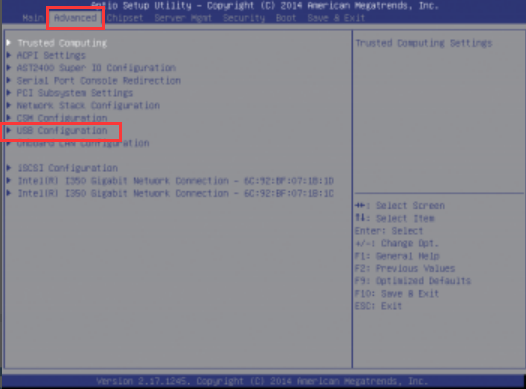
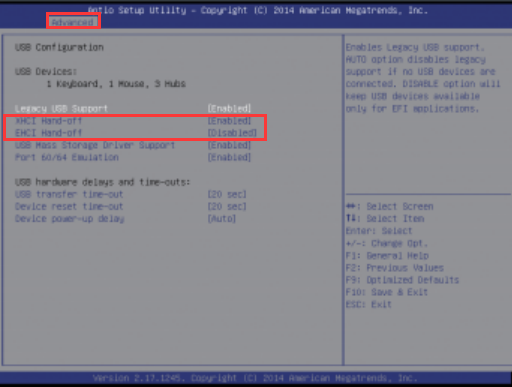
- , View [USB Configuration] interface, Select [EHCI Hand-off] and change the Value to [Enabled]. This is to enhance the host controller settings for the USB2.0 Interfaces ([XHCI Hand-off] is an option for USB3.0, enabled Default default). After Change, press F10 to Save configuration and Log Out.
- Restart the device, View BIOS, Select startup entries updated, and find that the USB flash drive can be recognized
Root cause
Medium the current network environment, the USB disk standard uses the 3.0 Interfaces, but there are some 2.0 Interfaces. The 2.0 interface of Inspur Yingxin server NF5270M4 Yes Close, so the USB disk cannot be recognized.
solution
View [USB Configuration] interface, Select [EHCI Hand-off] and change the Value to [Enabled]. This is to enhance the host controller settings for the USB2.0 Interfaces ([XHCI Hand-off] is an option for USB3.0, enabled by default). After Change, press F10 Save configuration and Log Out. Restart the device to be recognized Connected.
Operation Impacts Applicable To
None
Is Yes temporary solution?
None
Original Link
https://support.sangfor.com.cn/cases/list?product_id=156&type=1&category_id=23030&isOpen=true