
[Hardware troubleshooting] Two devices are directly connected Restart the optical port of the restarted device is not lit System
Problem Description
This problem occurs on the optical port of X722
solution
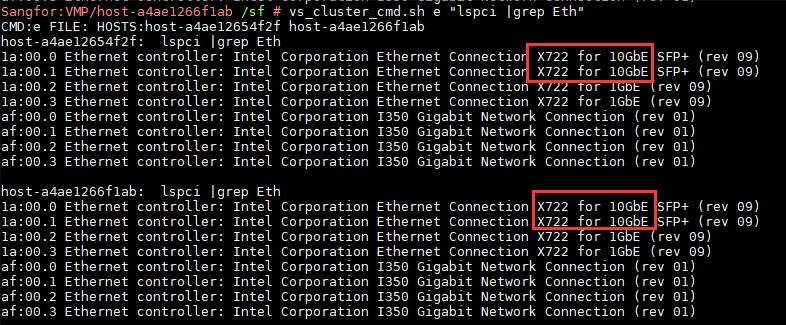
- Enter the backend View Interface chip, command: lspci |grep Eth, to see if there is an X722 optical port.
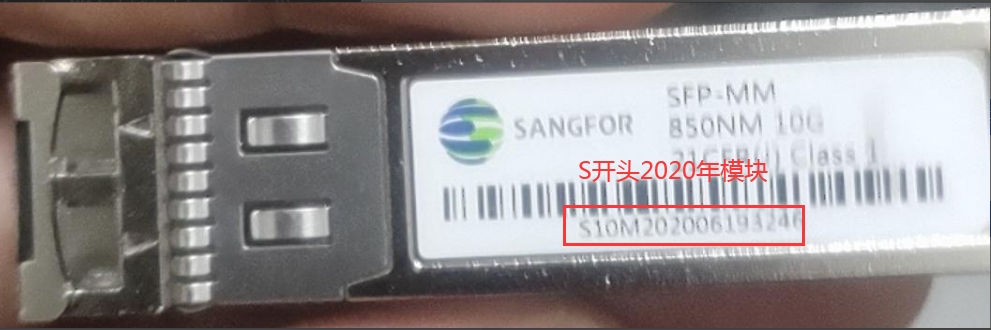
- Check whether the optical module and optical fiber cable match (10G multimode to 10G multimode, use multimode cable, 10G single-mode to 10G single-mode, use single-mode cable). If Yes our company's optical module, take a photo to OK. For example, if the module with SN starting with S is produced before 2021, two X722 optical ports are directly connected. There is a problem that the link cannot and Restart the device and plugging and unplugging the optical fiber cable. The temporary solution Yes unplug the optical modules at both ends, connect the cable to the optical module first, and then plug the optical module into the optical port. The complete solution Yes to repair the optical module and replace it with a module produced after 2021 (the modules produced after 2021 have resolved this compatibility issue).
- If it is a thirdWedparty optical module, not a module Medium our Compatibility list, try to unplug the optical modules at both ends, connect the cable to the optical module first, and then plug the optical module into the optical port to see if it can link. If it cannot link, you need to replace it with a compatible module.
Cause:
- The module is powered on, the transmitter is working, and there is light input at the receiving end. The two different triggering modes of RX_LOS bring different results:
A. DC_LOS: The server does not provide a modulation signal. At this time, the average optical power is greater than the LOS threshold, and the LOS signal is released; the device detects that the optical path Connectivity is normal., starts registration, and System Finish registration and can LINK Connected.
B. IAG: Services server does not provide a modulation signal, the signal amplitude (LA Peak Value) is lower than the threshold, the LOS signal is not released, Services server determines that there is no received optical power, System does not start registration, and cannot LINK. - X722 requires the module's LOS Mode to be DC LOS when linking. Passed changing the Mode LOS mode, change the IAG LOS mode to DC_LOS, and re-test the device by repeatedly Auto unlock after and unplugging the module, the link can be Connected up.
- The difference between the two LOS methods:
A. IAG: detects LOS information Passed judging the minute amplitude of the signal Info; the signal that triggers LOS comes from the LA Peak Value.
B. DC_LOS: detects LOS information Passed judging the average optical power of the module receiving Info; the signal that triggers LOS comes from the RSSI Value; the module can be Settings to DC_LOS OR IAG. The change of RX_LOS trigger mode will only Impacts the module LOS judgment Mode and has None the module performance.
Original Link
https://support.sangfor.com.cn/cases/list?product_id=156&type=1&category_id=22690&isOpen=true