
[VDI] VDS Cannot Login to IPMI
Issue Description
VDS cannot use the default address 192.168.10.10 to log in to IPMI.
Handling Process
-
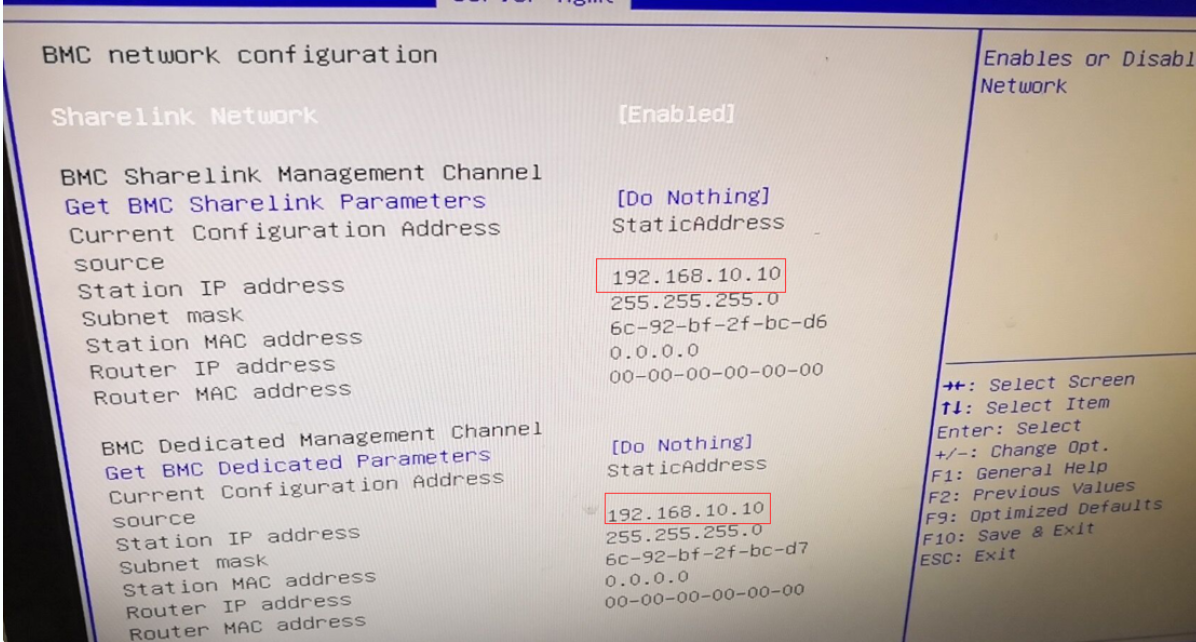
To access the BIOS on a VDS, you must press the BIOS key set by your mode, which could be [DEL], [F11], or [F2]. Then, go to Server Mgmt > BMC Network Configuration to check the network configuration.

-
It is found that there is an IP conflict between the Sharelink management and Dedicated Management.
Root Cause
There is an IP conflict between the Sharelink management and Dedicated Management.
Solution
Disable the sharelink network, then press [F10] to save and exit.
