
[HCI]HCI VM Backup Failed “Virtual machine disk has not been initialized completely. Please try again later”
Issue Description
Trying to backup virtual machine but failed with error description of "Virtual machine disk has not been initialized completely. Please try again later".
In this case, the virtual machine is migrated from VMware to HCI and running on the external storage (iSCSI), will be backing up to another external storage (iSCSI).
Error/Warning Information
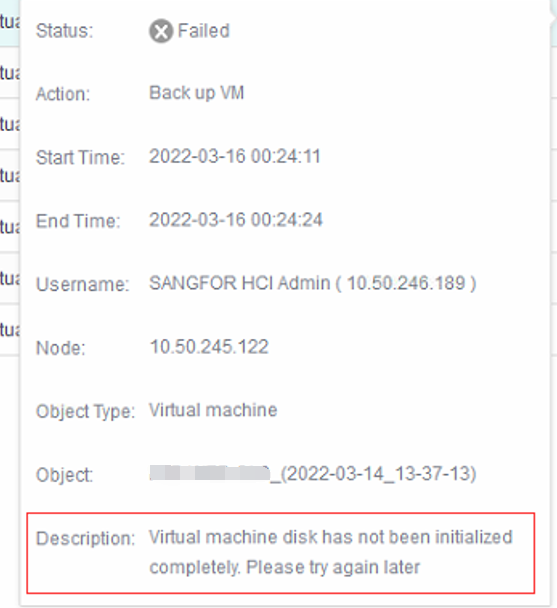
Handling Process
-
Make sure the virtual machine has vmTools installed.
-
Reboot the virtual machine after vmTools is installed.
-
Try to execute backup again and it is backing up now.
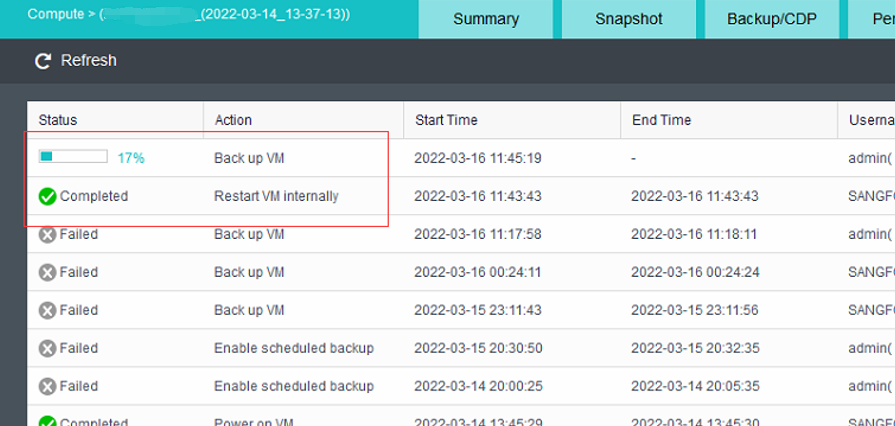
Root Cause
- The virtual machine is not restarted after the vmToolsl is installed.
- The virtual machine is migrated from VMware/Convert and is not restarted after the vmTools is installed.
Solution
Refer to the handling process.
Suggestions
If the scenario varies from above or the solution doesn’t work, kindly consult specialist or R&D for further verification.