
[SCP]Failed to import SCP license file
Issue Description
While trying to renew SCP license, SCP prompted alert “Failed to register license of the component Network Virtualization (aNET)(aNET). The licensed number of resources is insufficient. Please upgrade the license.”
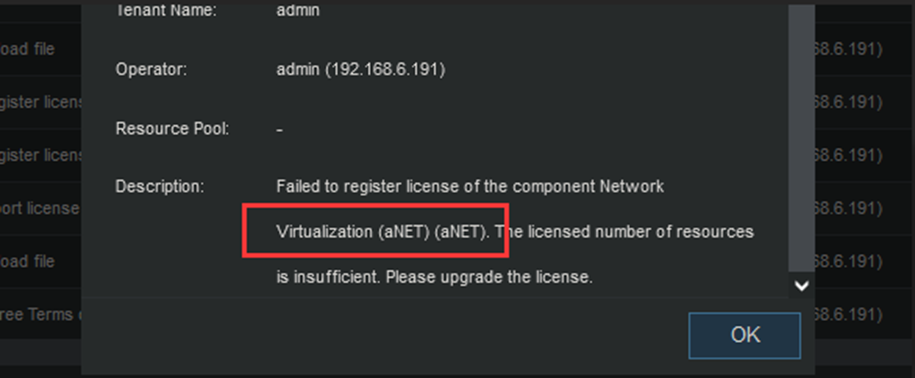
Error/Warning Information
- Verify the total host CPU that required by user for its environment. If user required more host CPU for a particular license module, it will require user to reapply for a new license file.
-
If user assigned extra host CPU to a particular HCI cluster, it may resulting the SCP assigned host CPU does not tally with the purchased SCP license.
In this case, user will need to:
a. Revoke the assigned host CPU from HCI cluster from SCP.b. Restart the sn services.
c. Reimport the license file.
d. Reassigned the host CPU to the respective HCI cluster.
Handling Process
-
Verify the total CPU core assigned by the SCP, Currently SCP has assigned 6 CPU Host for the aNET module.
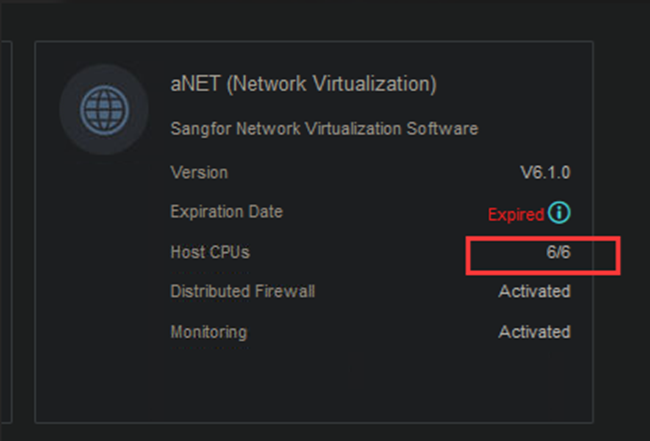
-
Access SCP backend, to check the license information.
a. Firstly, enter commandsource /sf/bin/keystonerc_admin
b. Then, enter commandfuel analyze-sn --product aNET–sn [license of aNET]]
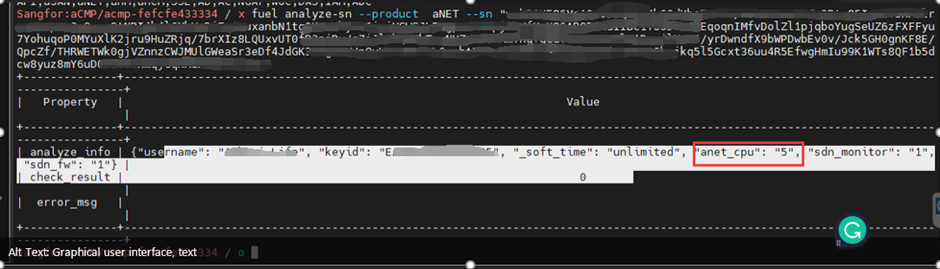
Root Cause
As per checking, the aNET license subscribe was only provide 5 host CPU cores permission. However, the SCP was assigned 6 host CPU for its managed HCI cluster.
Solution
-
When encountering this kind of error message, verify whetherthe purchased license subscribes enough license based on the actual client environment.
-
If the user environment required more host CPU, it will berequired to register a new aNET license. Contact local presale/sale to proceedwith the license registration.
Suggestions
-
The command
fuel analyze-sn –[product] [module license],can be apply for all module license. -
Change the
[--product]with module name, and filled in the module license on[module license]will do.