
【NGAF】Authentication Captive Portal Not Showing Up When Accessing HTTP Website
Issue Description
Authentication captive portal not showing up when accessing HTTP website
Handling Process
-
Access to http://NGAFIP , able to access authentication captive portal page.
-
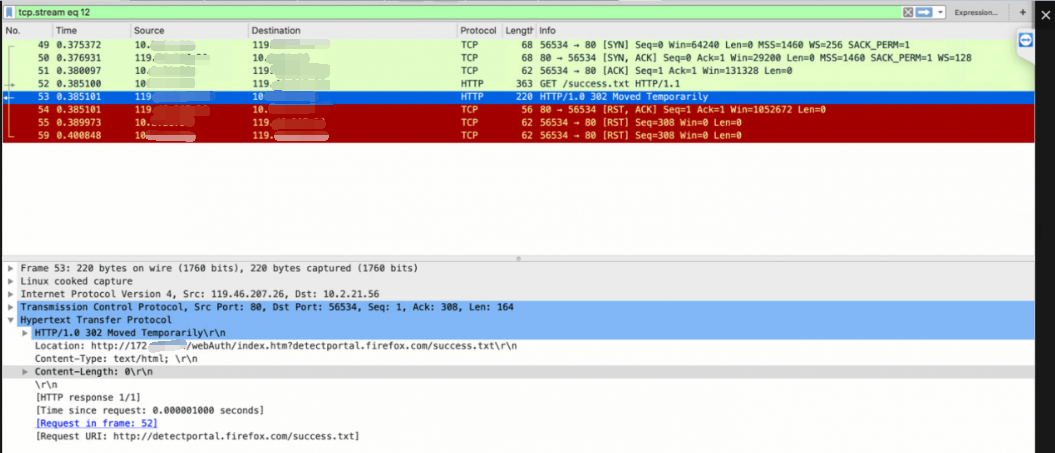
Capture packets in NGAF and PC, found out that after NGAF reply HTTP 302 to PC to redirect to authentication page, it directly sent a RST packet to reject connection and no more packets after that.
-
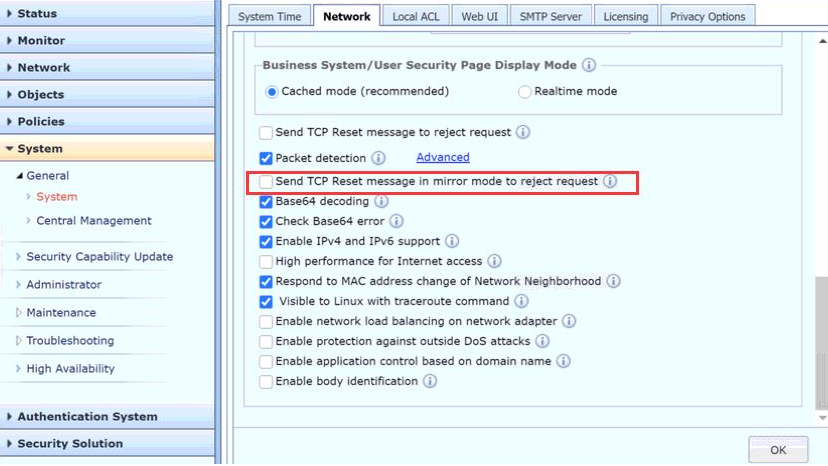
In System > Network, found that “Send TCP Reset message in mirror mode to reject request ” is ticked. As NGAF not in mirror mode, untick this option.
-
After untick this option, captive portal can pop out now on HTTP website.
Root Cause
In System > Network, found that “Send TCP Reset message in mirror mode to reject request ” is ticked.
Solution
Untick “Send TCP Reset message in mirror mode to reject request “.