
[AF] Service Policies exception after adding policy routing
Problem Description
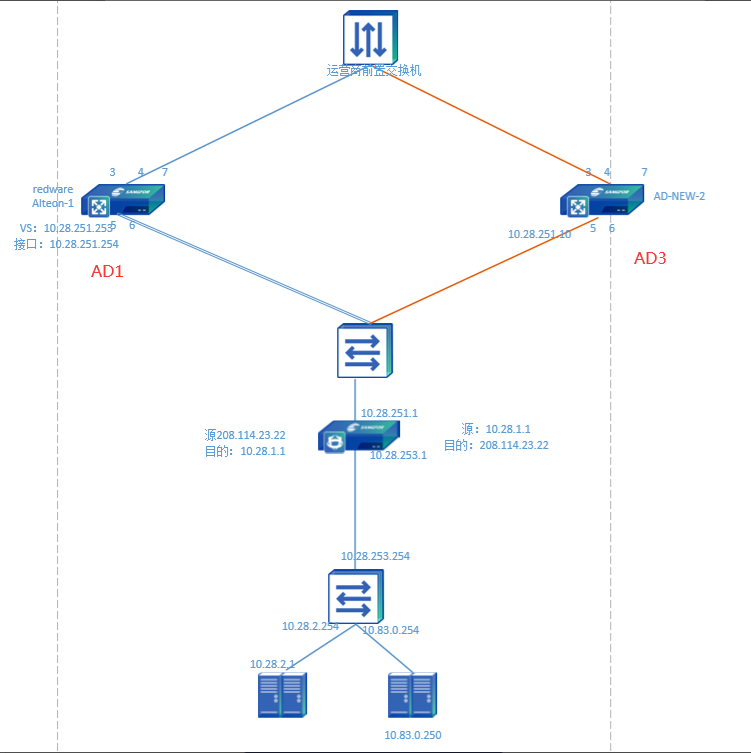
Environmental Info as shown in the figure:
- Normally, business traffic passes through AD1 and then is forwarded to the Local to the intranet.
- AD3 is added as the next hop for some Services in the intranet to access the Internet.
Problem phenomenon:
A new Policies Layer 3 was added: "Source: Intranet Zones, 10.83.0.250; Destination: Public network, all; Next hop: 10.28.251.10". After Policies, some of the services coming in through AD1 were not accessible (the access without going through SNAT was abnormal, and the SNAT services were normal after passing through the AD proxy). The service was restored immediately after disabling Policies Layer 3.
Effective troubleshooting steps
- The Local before and after the customer's firewall are equipped with full-flow analysis equipment, which provides data packets. According to the customer's conclusion, the Local does not forward the data packets coming from the public network, as shown in the following figure:
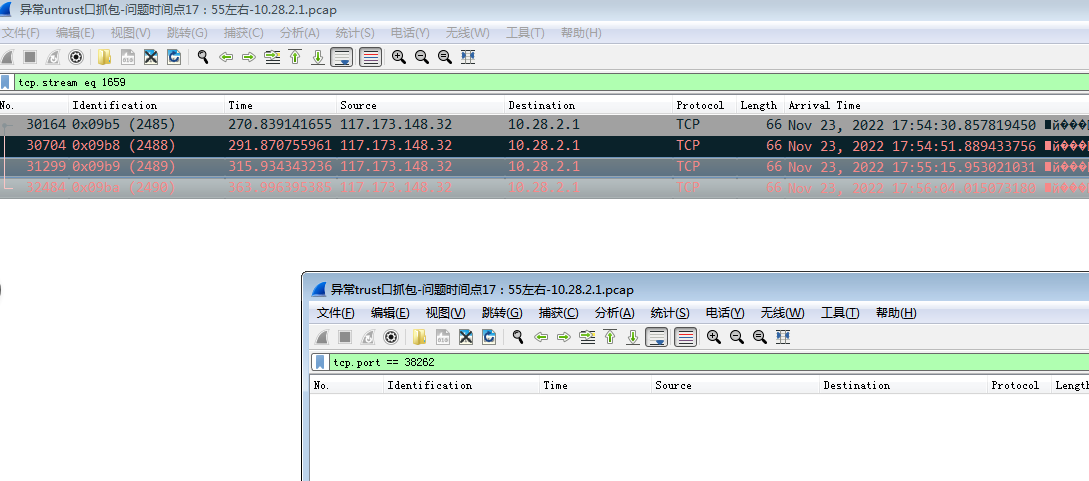
When I started to investigate, I was led by the customer and kept wondering why the data packets with public source IP addresses were not forwarded. But if you look closely at the normal data packets on the intranet port, you will find that they are all one-way requests:

This shows that there is a problem with the client’s packet capture. This data packet is unreliable, so all conclusions based on this data packet are overturned. PS: Don’t just accept the conclusion given by the customer. You must make your own judgment and analysis to make a qualitative decision.
2. If packet capture is not available, try another approach to troubleshoot.
It is found that the WAN attribute is enabled on the customer’s external network port. Think about what Layer 3 WAN attribute + Policies routing will trigger? Source in and source out! Interfaces WAN attribute + an Interfaces Policies Layer 3 will trigger the source in and source out, and all the server return Services traffic will go to 10.28.251.10. The incoming traffic goes through AD1, and the return packets go to AD3, so naturally the service is blocked.
Root cause
New Policies Layer 3 is added, causing all the traffic from the Services source to the source and the server to return to 10.28.251.10, resulting in service abnormalities.
solution
Just get rid of the source in and source out
Reference: [AF] Policies source in and source out troubleshooting
- Remove the Interfaces wan attribute.
- Add another Policies Layer 3 and write the Next-Hop IP on the left side as AD1
Original Link
https://support.sangfor.com.cn/cases/list?product_id=13&type=1&category_id=2017&isOpen=true