
[AF] Local Network Objects module opens slowly and needs to wait for 7-8 seconds
Problem Description
Local Network Objects module opens slowly and takes 7-8 seconds to open. Other modules are normal.
Effective troubleshooting steps
- You can cd /fwlog/log_ data/tiny_ table/sqlite/
ls -shl to see the file Sensitive_Data_System and the file /back/Sensitive_Data_System.back in the directory.

- Back up to other places to see if the opening speed is normal. This operation and R&D confirmation will not affect the business.
/etc/init.d/TinyTabProxy stop
cd /fwlog/log_data/tiny_table/sqlite/
mv Sensitive_Data_System /fwlog/bak0413 (temporarily moved to another place for backup)
mv ./back/Sensitive_Data_System.back /fwlog/bak0413 (temporarily moved to another place for backup)
/etc/init.d/TinyTabProxy restart - After executing the operation, the speed of opening Network Objects is significantly improved, about 1S
Root cause
I confirmed with R&D that the problem was that the small table file was too large. When I clicked Network Objects module, I would check Sensitivity when Obtain Network Objects, and would frequently operate the database, which led to a slow operation.
solution
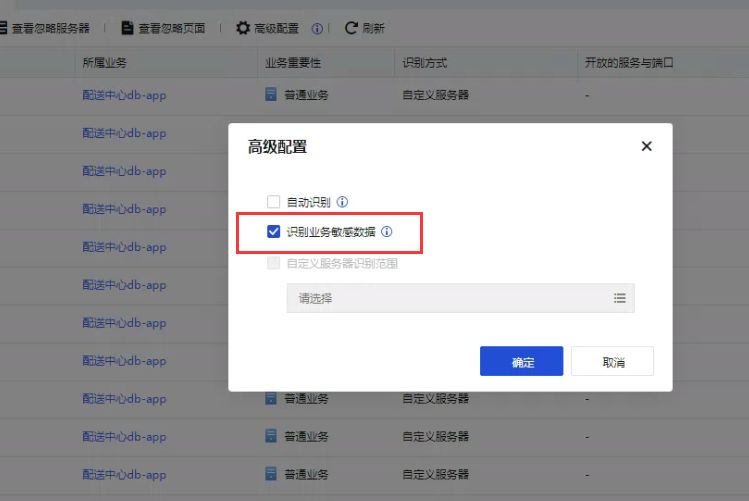
Turn off automatic identification and identify business Sensitivity solutions
Suggestions and Conclusion
The client is a hospital business. Too much Sensitivity identified, resulting in a large file size. When clicking on the module, the data will be queried. It is recommended to turn off automatic identification and identification of business Sensitivity
Original Link
https://support.sangfor.com.cn/cases/list?product_id=13&type=1&category_id=1586&isOpen=true