
[AF] Linux anti-tampering client shows that the unprotected server memory usage is too high
Problem Description
The configuration is correct, but the Linux anti-tampering client shows that it is not protected.

Effective troubleshooting steps
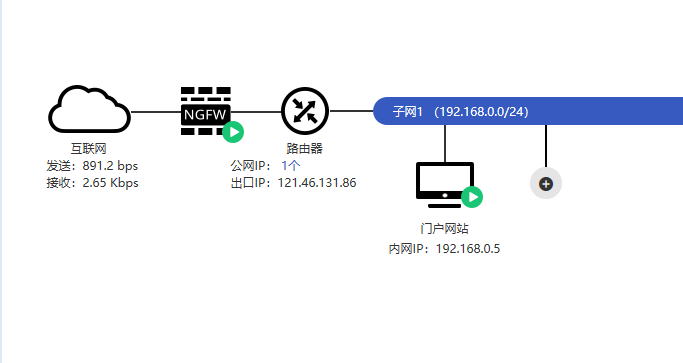
- This is cloud vaf, the intranet has a nat environment, but it also supports anti-tampering. The customer Network topology is:
2.png (17.5 KB) - Check the anti-tampering configuration, there is no problem, and the driver is mounted normally;
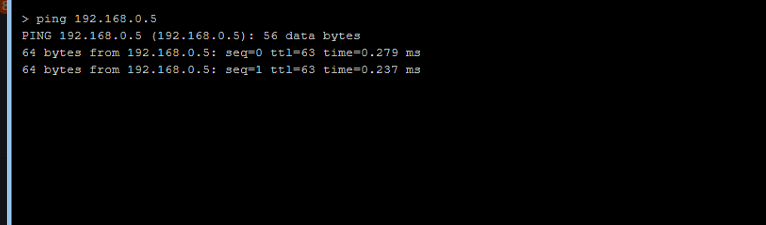
- Network can be connected normally. Here you can perform a ping test on Local:
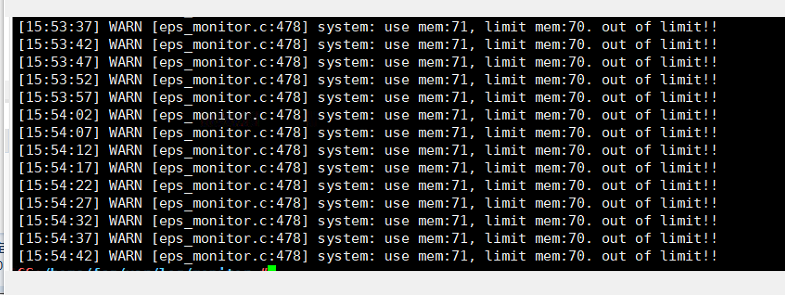
3.png (21.81 KB) - Check the anti-tampering log and find that the Linux server System memory usage exceeds 70%. The anti-tampering log is in /var/log/ of the corresponding installation directory. For example, if the installation directory here is /root/tools/eps, Logs log is in /root/tools/eps/var/log/;
4.png (159.03 KB) - Reduce the memory usage to below 70% to ensure normal protection.
Root cause
When the device memory usage exceeds 70%, the following two situations may occur:
- The anti-tampering client can be protected normally, but the anti-tampering log will not be transmitted, and the page will show that it is not protected;
- The anti-tampering client is bypassed, which means that anti-tampering protection cannot be performed.
solution
- Reduce the memory usage of the Linux server to below 70% or increase the memory;
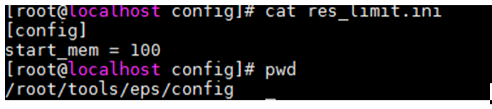
- If the customer cannot reduce memory usage and still wants to use the anti-tampering function, you can create a new file in the installed config directory with the file name res_limit.ini and write the following content to turn off the bypass mechanism when the memory usage exceeds 70%.
In the tamper-proof configuration directory: vi res_limit.ini (modify using vi editor)
5.png (29.83 KB)
PS: If you don't remember the tamper-proof installation directory, you can use the find command to find it
find / -name eps_agent or find / -name eps_services
Suggestions and Conclusion
Regardless of whether anti-tampering is effective or not, the memory usage of the Linux server must be checked.
1.png(88.04 KB)
Original Link
https://support.sangfor.com.cn/cases/list?product_id=13&type=1&category_id=754&isOpen=true