
[AF] After Layer 2 deploying AF, the intranet PC cannot Obtain IP address through DHCP
Problem Description
NGAF 7.5.1
Internet — Layer 3 — AF (Virtual wire) — Behavior management (bridge) — Critical is layer 2, the uplink port is trunk, DHCP is configured on the export Layer 3, the wireless VLAN cannot Obtain IP, and the Network Segment of the wireless VLAN is 10.1.101.1/24, 10.1.102.1/24
Process——
- It Network Segment manually configure the IP Address of the wireless network segment
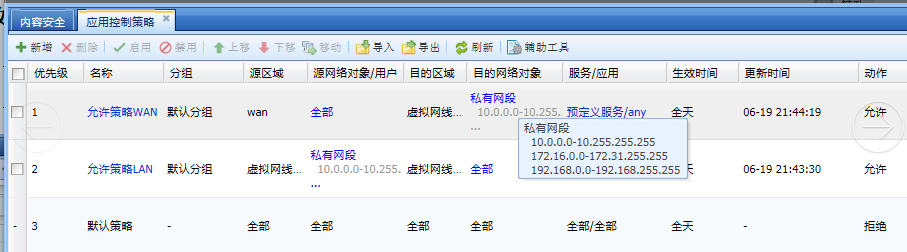
- Check the application control Policies and grant access to the intranet IP address.
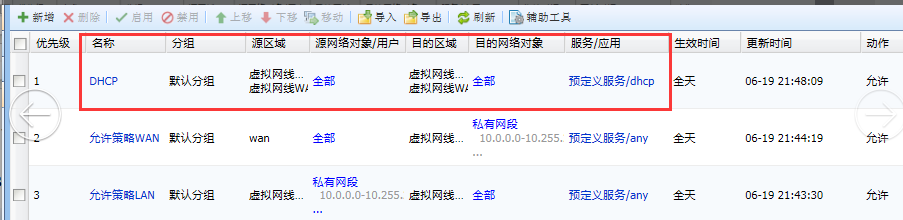
819915b32f8459a60f.png (56.05 KB) - After adding the application control Policies, it is normal. The source and destination IP are all, the DHCP protocol is allowed, and the intranet computer Obtain DHCP normally.
550545b32f87e14039.png (54.84 KB)
Root cause
The source IP of the DISCOVER packet of the DHCP request data is 0.0.0.0, and the destination IP is 255.255.255.255. If Policies application control policy does not allow the corresponding IP data, it will be blocked by the default Policies.
solution
Add application control Policies source, destination IP is all, allow DHCP protocol
Original Link
https://support.sangfor.com.cn/cases/list?product_id=13&type=1&category_id=52&isOpen=true