
[AF] IPS and Network functions cannot be used because the Security Databases serial number is not opened
Problem Description
NGAF 7.5.1
The user has enabled the basic level function and cannot use the IPS and Network protection functions
The serial number is as follows
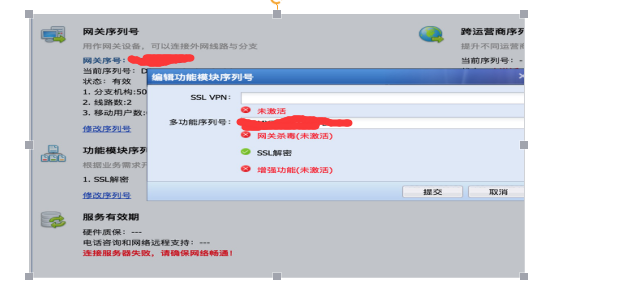
404145b32f2099a3c8.png (79.56 KB)
Warning Info
N/A
Process——
- Check the serial number. It is a basic level authorization. The serial number is not wrong.
- AF version 7.2 and later has basic functions by default, and the multi-function serial number will not display the basic level. If you need to use the basic level IPS and Network functions, you need to activate the Security Databases upgrade serial number.
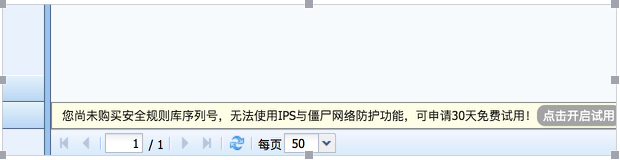
808625b32f257cb911.png (39.25 KB) - If the customer has not purchased the Security Databases serial number, he/she cannot use the IPS and botnet functions. You can apply for a trial.
Note: - The basic level is suitable for terminal security protection scenarios at the Internet exit, including basic Local functions, intrusion protection, Network detection (including cloud sandbox detection) and other functions
- The enhanced level is suitable for server protection scenarios in data centers and external release Zones. In addition to the basic level functions, it adds Web security + web Anti Web Defacement tamper prevention + Passive Vulnerability Scan functions
Root cause
AF has the basic level functions enabled by default. To use the IPS and botnet functions, you need to enable the Security Databases serial number.
solution
If you need to use IPS and Network functions, it is recommended to enable the Security Databases serial number, and you can apply for a 30-day free trial
Original Link
https://support.sangfor.com.cn/cases/list?product_id=13&type=1&category_id=50&isOpen=true