
[AF] System log reports “Failed to set SMTP server address”
Problem Description
The alarm email on the device cannot be sent out, and the System fault log reports "Failed to set the SMTP server address", as shown below:

851065b6d852747bc4.png (22.96 KB)
Process——
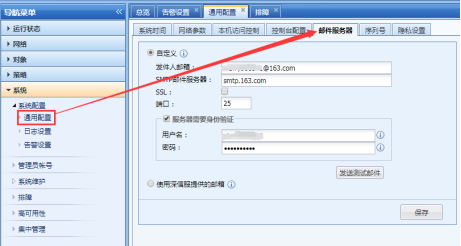
- Confirm that the domain name configured for the alarm email is smtp.163.com, as follows:
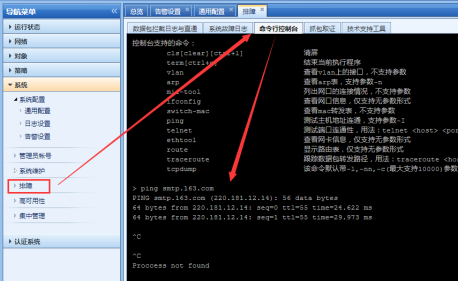
896945b6d853a3657e.png (44.32 KB) - Local pings the domain name smtp.163.com without any problem, as follows:
121445b6d854b6b902.png (78.78 KB)
Root cause
NetEase Mail blocks Local test emails and warning emails.
solution
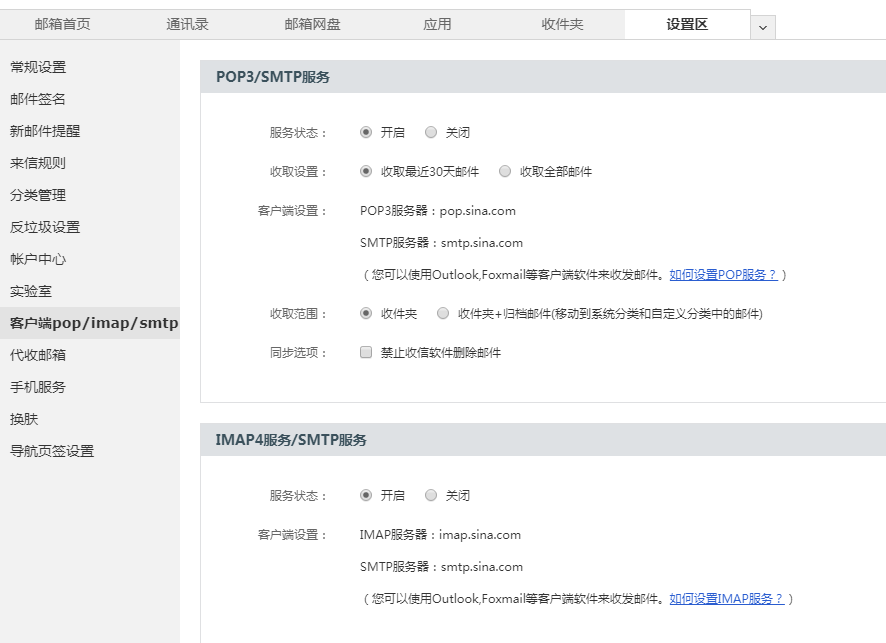
It is recommended to change to Sina mailbox, Sina mailbox to open the SMTP client Services, the settings are as follows:
806925c10f531b8bdd.png (65.33 KB)
Suggestions and Conclusion
The email sending principle of the Local is the same as that of the foxmail client. Before using the email alarm, you can use the foxmail email client to test whether the email sending is normal.
Original Link
https://support.sangfor.com.cn/cases/list?product_id=13&type=1&category_id=268&isOpen=true