
[AF] AF6.8 VPN Services cannot be enabled and reports “IPSEC IKE daemon startup error”
Problem Description
AF's IPSEC VPN Services does not start
Affected versions: AF 6.8 and later

474365b19f1de2150a.png (22.4 KB)
Click Start Services, but it still cannot start normally.

973785b19f1ef31e42.png (14.1 KB)
Check System fault Info, there is error information

310105b1a48d49d395.png (17.62 KB)
Root cause
After AF 6.8, the VPN Services is associated with the Interfaces. If the configuration is incorrect, Services will not start normally.
solution
- Check the Interfaces configuration, check the [WAN attribute] properties, and check [Match with IPSEC VPN export line]
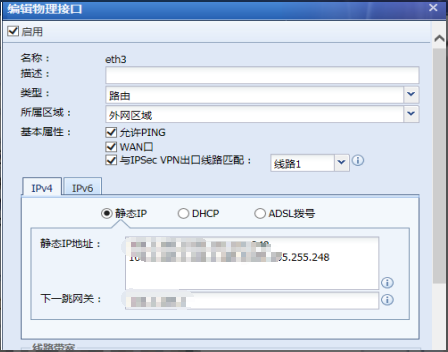
991265b644f5e8c49e.png (46.59 KB) - If Interfaces has multiple IP addresses, such as 192.168.1.2-192.168.1.5/255.255.255.248
Do not fill in the range in the first line, such as 192.168.1.2-106.2.1.5/255.255.255.248
For the first one, directly fill in a single IP 192.168.1.2/255.255.255.248, and then fill in 192.168.1.3-192.168.1.5/255.255.255.248 in the next line
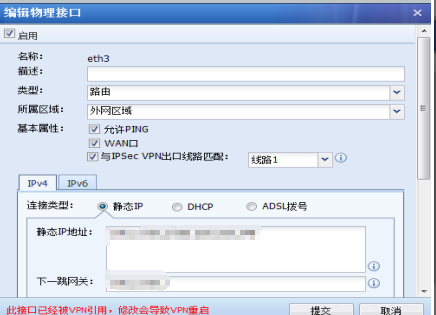
189495b644f70a3223.png (44.61 KB) - The line exit selection for third-party connection will also affect the DLAN Services. It needs to be consistent with the WAN attribute checking [Match with IPSEC VPN exit line]
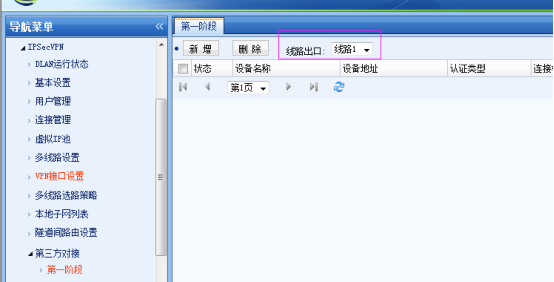
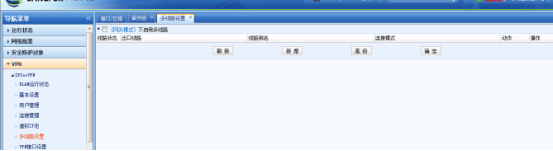
329045b19f261a91a4.png (40.18 KB) - If there is only one line to the external network, do not configure multiple VPN lines and uncheck it; if it is checked, you need to configure multiple lines;
If there are multiple exits in the external network, check the VPN multi-line configuration, configure multiple lines, and the multi-line Policies configuration Interfaces will display activated.
549605b19f2721b055.png (23.19 KB) - The VPN intranet Interfaces needs to be configured
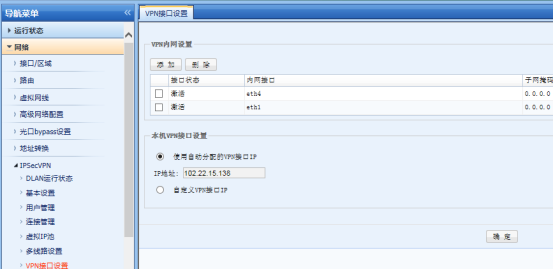
923465b19f28abd300.png (38.01 KB)
Original Link
https://support.sangfor.com.cn/cases/list?product_id=13&type=1&category_id=30&isOpen=true