
[AF] How to prevent SQL injection attacks against a single source IP
Problem Description
The client partner's IP Address submits a large number of SQL statements to Services server, which are often intercepted by AF by mistake. SQL Injection detection needs to be enabled for the corresponding IP, but other attacks need to be protected.
Process——
- Obtain partner's external IP Address (e.g. 11.11.11) and the customer's server internal address (e.g. 10.10.10.10), add a new policy to allow SQL Injection, and select Allow as the Policies action.
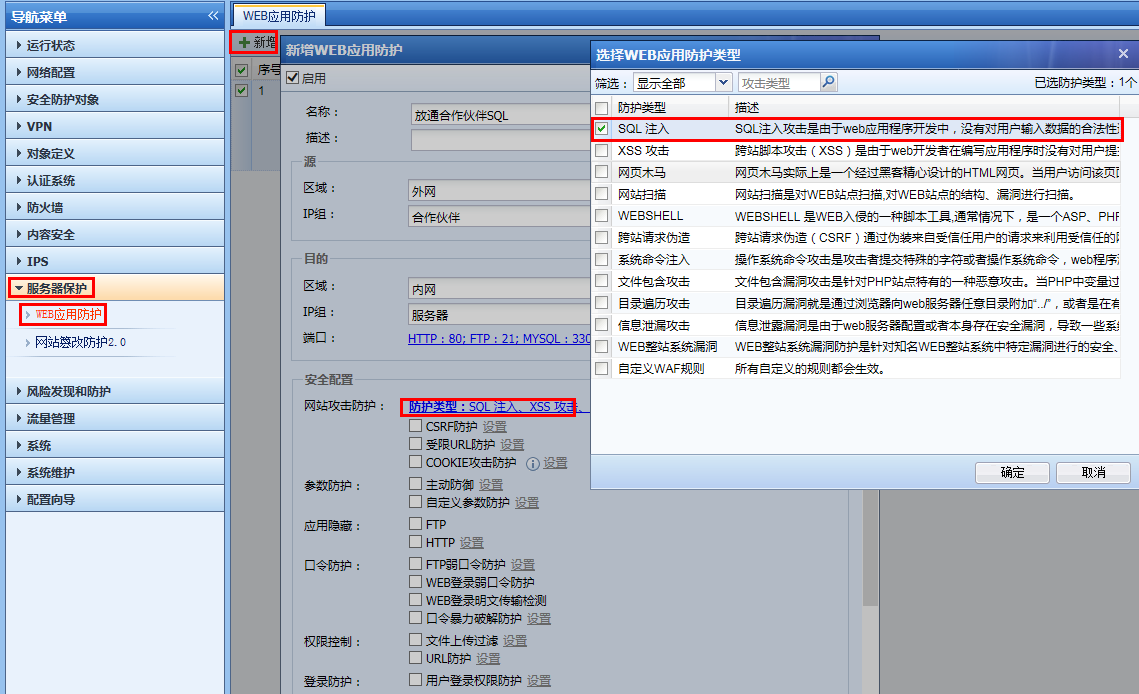
76125b798ab92e52e.png (173.52 KB)
[attach]218468[/attach]
2. Place the newly added Policies on top of the original interception Policies to allow the corresponding data to pass.

617845b798b20830f4.png (17.61 KB)
solution
For partner IP, add a new WAF Policies to select SQL Injection injection attack, and select allow Policies action to release the corresponding data
① Take the standard version AF7.3 as an example: you can add a new Policies in [Server Protection] – [Web App Firewall], and check [SQL Injection] in [Website Attack Protection] – [Protection Type], select Allow for Policies action and then submit.
③ Take the standard version AF7.4 as an example: You can add a template in [Objects] – [Security Policies Template] – [Web App Firewall], and check [SQL Injection] in [Website Attack Protection] – [Protection Type].
Then add [Business Protection Policy] in [Policies] – [Security Policies] – [Security Protection Policies], select [Corresponding Template] in [Defense] – [Enhanced Function], select Allow for the Policies action and then submit
Suggestions and Conclusion
The security Policies follows the principle of top-down matching. You can add an allow policy before a deny Policies to allow the data content that needs to be allowed.
Original Link
https://support.sangfor.com.cn/cases/list?product_id=13&type=1&category_id=298&isOpen=true