
[AF] Source NAT cannot select the intranet Zones
Problem Description
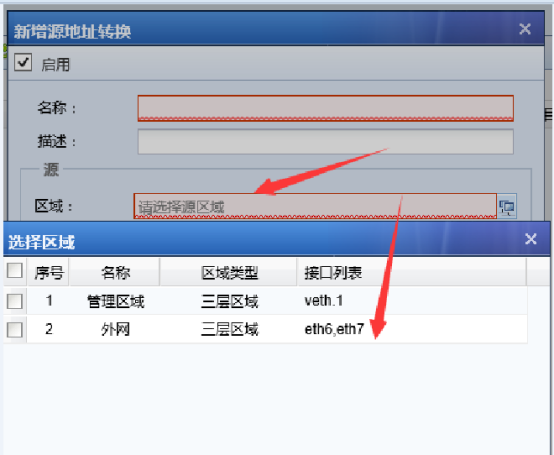
When doing SNAT, the intranet area cannot be selected, but the intranet area is seen in Interfaces>Zone, but not in the NAT>Zone, as shown in the figure below: 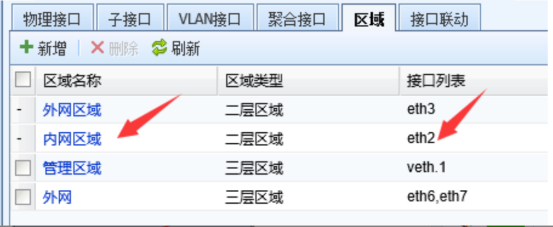
Process
- Source NAT means that after Policies matching, the source IP of the corresponding data packet will be modified to another IP. It is generally used for private IP configuration of intranet computers and public IP address of the Local external network port. The private IP will be converted to a public IP and the Internet will be accessed through the public IP. Therefore, the source area of the Source NAT needs to be a Layer 3, and the interface in the Zones needs to be a Layer 3 port. The intranet Zones in the figure is a Layer 2, and eth2 is a two-layer Interfaces, so it cannot be selected, as shown in the figure below
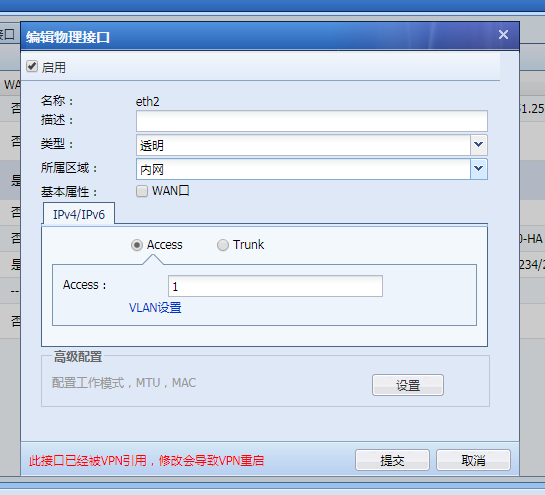 625075b5d3584a559c.png (41.72 KB)
 - If you need to implement Source NAT in AF, you can change the previous intranet Interfaces to a Layer 3 port and change the intranet Zones to a Layer 3, as shown in the figure
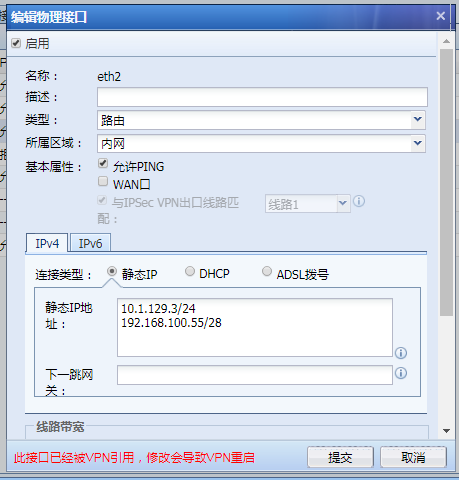 265495b5d35cedf771.png (45.62 KB)
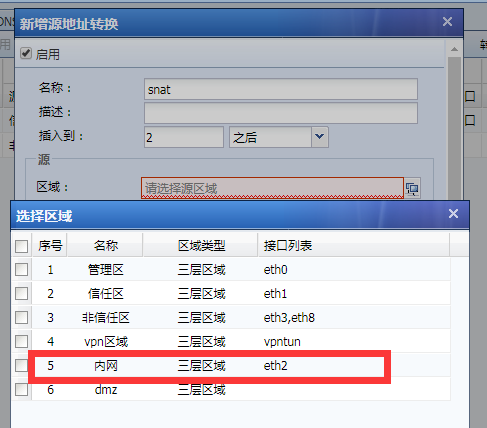 529355b5d35db93247.png (46.49 KB)
solution
Source NAT Zones only supports the Layer 3. Configure the internal network port as a three-layer Interfaces and select a Layer 3.
Original Link
https://support.sangfor.com.cn/cases/list?product_id=13&type=1&category_id=215&isOpen=true