
[SCP] HCI Virtual Machine cannot be synchronized to SCP, click the synchronization data task to succeed
Problem Description
The cloud host on the managed HCI cannot be seen on SCP, and no Virtual Machine is reported when clicking Synchronize Data in the Resource Pool list
Effective troubleshooting steps
- Check the log; HCI Virtual Machine to SCP, log path: /sf/log/today/apollo-sync.log;
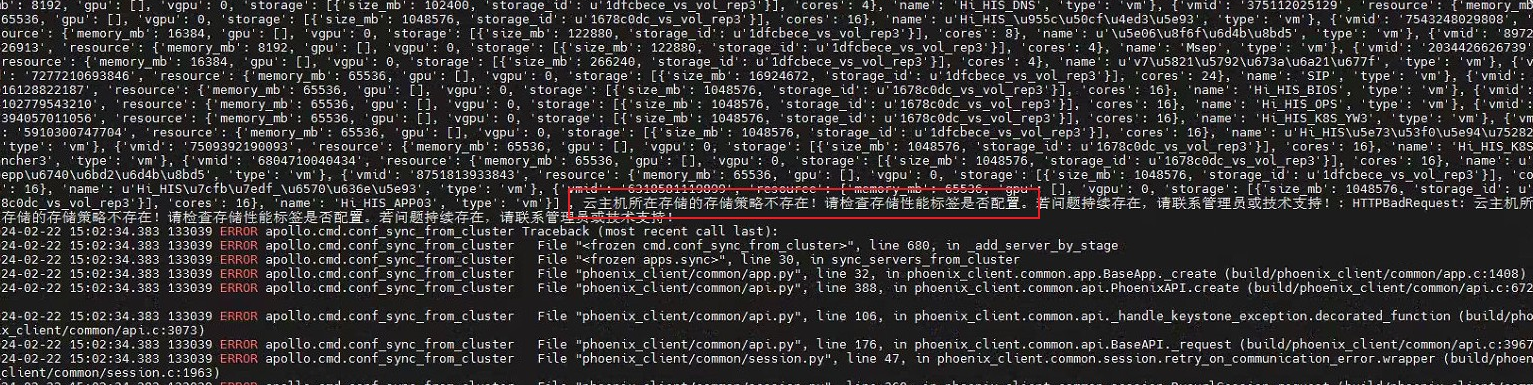
If the above error occurs, it means that the Storage Tag is not configured on the SCP. After configuring Storage Tag, resynchronize the data. - If some Virtual Machine are not synchronized to SCP, please refer to the case: https://support.sangfor.com.cn/cases/list?product_id=36&type=1&category_id=24930
Root cause
Storage resource in the selected resource pool has not been tagged.
solution
See troubleshooting steps
Operation Impact Scope
None
Is this a temporary solution?
No
Original Link
https://support.sangfor.com.cn/cases/list?product_id=36&type=1&category_id=26875&isOpen=true