
[IAG] DingTalk authentication in bypass mode failed
Problem Description
DingTalk authentication in bypass mode failed
Effective troubleshooting steps
-
The IAG is deployed in bypass mode and the user's Internet traffic has been mirrored to the device. However, DingTalk authentication fails and the user is prompted with a 403 error when scanning the QR code.
-
From the packet capture, the oauthservice.net domain name on the computer is normal, but the domain name resolution result is 2.3.4.5, which cannot communicate with 2.3.4.5, resulting in failure to interact with IAG to complete authentication
-
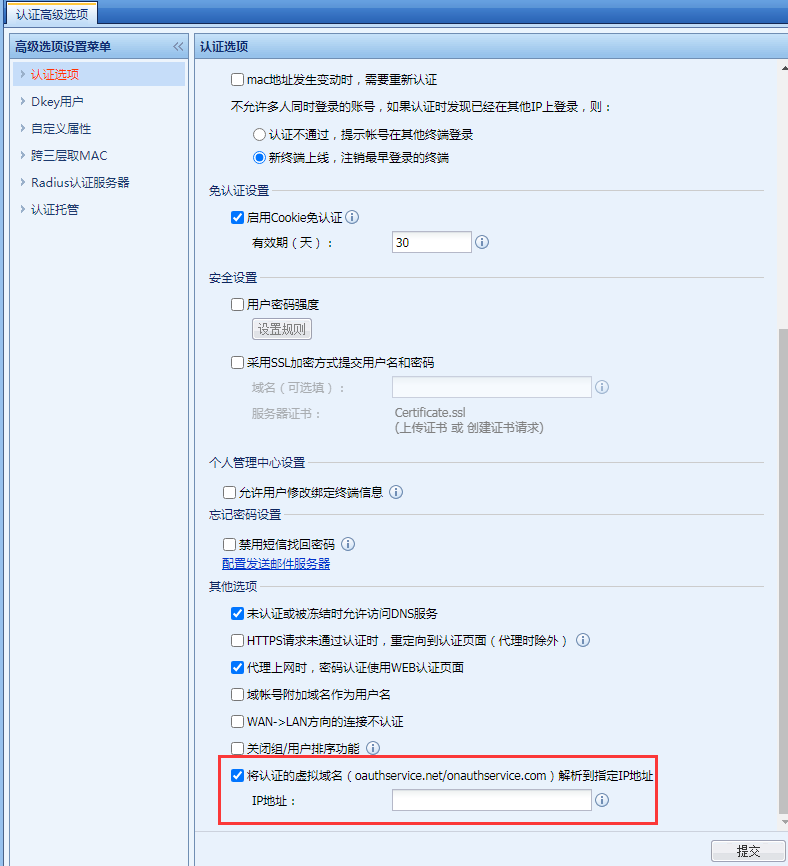
By using the following function on the device, oauthservice.net is parsed into the address of the bypass management port, and then the computer and the management port can communicate normally, and DingTalk authentication can be realized.
Root cause
The terminal device cannot communicate with the IP corresponding to oauthservice.net.
solution
oauthservice.net can be resolved into an IP address that can communicate normally with the device.
Original Link
https://support.sangfor.com.cn/cases/list?product_id=22&type=1&category_id=8292&isOpen=true