
【BBC】BBC retrieves the administrator login password of AC/SG policy template
Problem Description
Forgot the administrator password for the policy template and need to recover it
Effective troubleshooting steps
-
Management – System Settings – Security Settings Open the backend port, enter the BBC backend, port 22, account root, password + combination password
-
Use the docker ps -a command to check which container the policy template is.
-
Use the command docker exec -it dockerID bash to enter the container

Picture 1.png (98.99 KB)
- Use ls to view the files in the root directory. You can see that they are the same as the AC/SG physical device files.

Picture 2.png (67.3 KB)
- Find the /ac/etc/config/ctrluser.ini file, check the pass string corresponding to admin, and copy it;
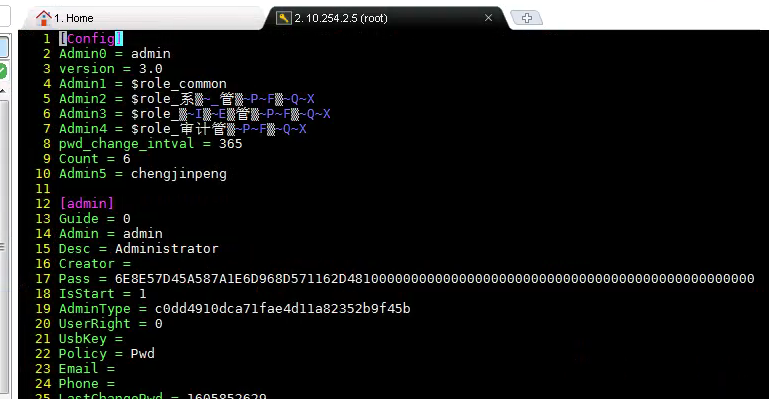
Picture 4.png (137.81 KB)
- Decrypt on the c3 platform to get the decrypted administrator password

QQ screenshot 20201120172227.png (52.83 KB)
Root cause
Customer forgets administrator password
Original Link
https://support.sangfor.com.cn/cases/list?product_id=63&type=1&category_id=19716&isOpen=true