
【BBC】MIG access to BBC prompts “Not the correct domain name or IP”
Problem Description
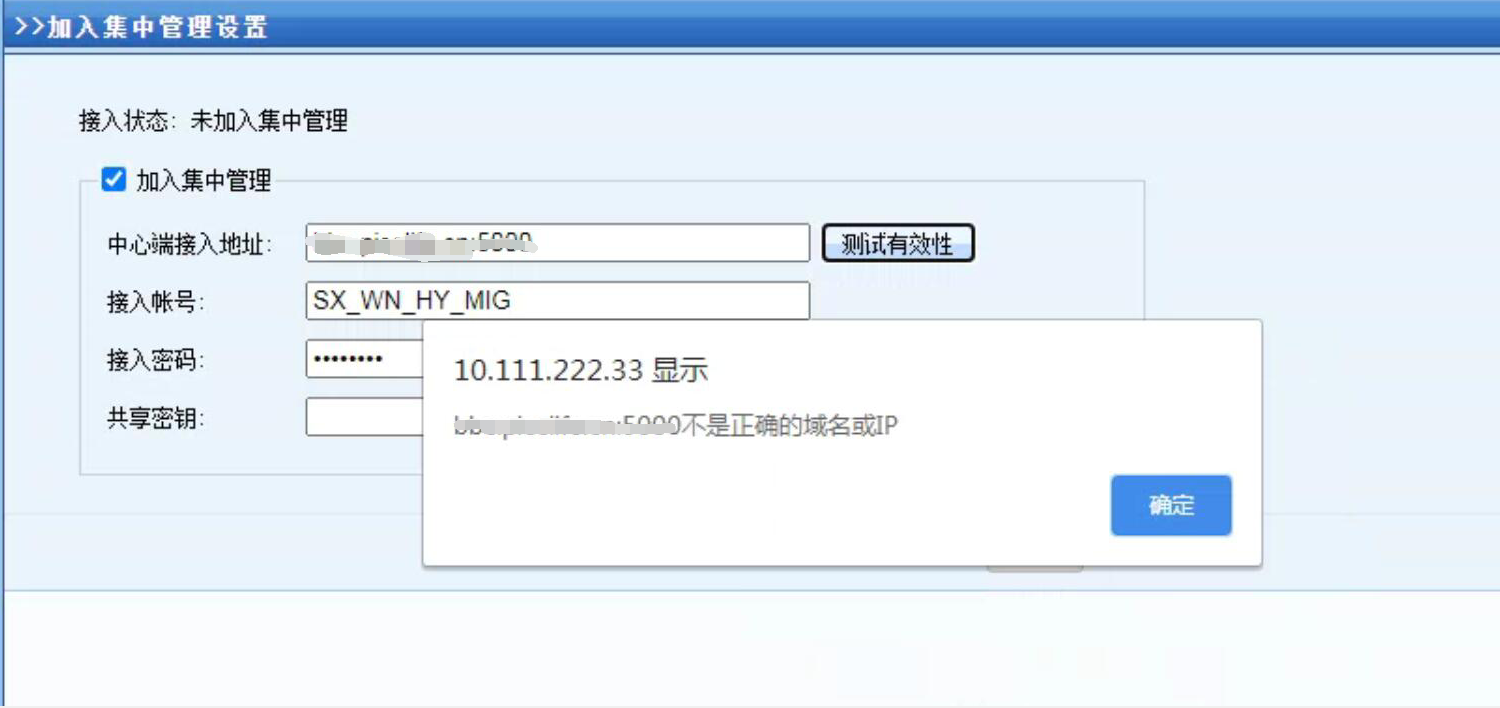
MIG access to BBC prompts "Not the correct domain name or IP"
Effective troubleshooting steps
-
Use the default password dlanrecover to exit BBC control, copy and paste the access address from BBC's [Management] – [System Settings] – [Access Address Settings], and the error message is still "Not a correct domain name or IP."
-
Switch to the English keyboard and manually enter the domain name and port, but the error message is still "Not a correct domain name or IP."
-
It is understood that the customer uses email easy deployment and reported that the deployment process failed. It is recommended that the customer re-apply for the email easy deployment file from the headquarters and access will be normal after re-deployment.
Root cause
When MailEasy is deployed and imported, the script of the BBC module will be modified. Due to browser compatibility issues, the module modification is interrupted halfway through, resulting in the domain name and IP being unable to be recognized.
solution
Re-apply for the email easy deployment file and re-import it using IE browser.
Original Link
https://support.sangfor.com.cn/cases/list?product_id=63&type=1&category_id=19761&isOpen=true