
[BBC] BBC device overview shows branch WOC alarm: Not all connections configured in connection management are successfully connected
Problem Description
The BBC device overview shows a branch WOC alarm:
-
Not all connections configured in the connection management are successfully connected
-
Some of the multi-line connections to the headquarters are disconnected
Warning Information

Effective troubleshooting steps
- Check the multi-line related configuration and VPN connection status. The branch has a single line, the headquarters has multiple lines, and the VPN connection status is normal. There are 2 VPNs in total, and the connection is normal. As shown below, the VPN connection status of the headquarters:
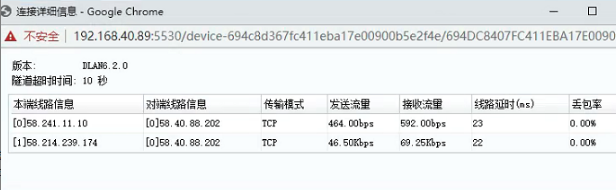
- For branch connection management, only one connection is configured, and the connection is successful.

- Check the user management of the branch and find that there is a Guest user, as shown below:

Root cause
There is a Guest account in the branch WOC that is not connected to the VPN, so BBC will report the above error
solution
The problem can be solved by deleting the Guest account for this branch WOC on BBC and re-issuing the VPN configuration.
On BBC, go to [VPN] – [VPN Device Overview], find the specified branch WOC, click [Edit] – [User Management], find the Guset account to delete, then select this branch WOC and click [Send VPN Configuration]
Original Link
https://support.sangfor.com.cn/cases/list?product_id=63&type=1&category_id=19718&isOpen=true