
[BBC] The “Remote Access” button of the branch is gray, and you cannot log in to the branch device through BBC single sign-on
Problem Description
When logging in to a branch device through BBC, the "Remote Access" button is grayed out, which means that you cannot log in to the branch device through BBC.
Process——
-
Check that the branch is an AC device. The AC device has been properly connected to the BBC and the status is normal. However, when you want to log in to the AC device through BBC single sign-on, you find that the remote access button is gray.
-
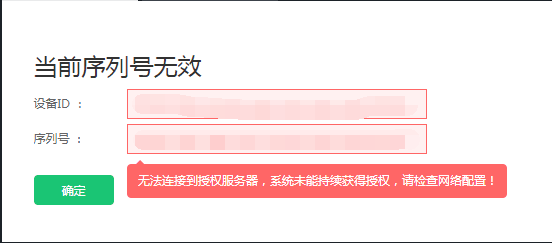
Check the device serial number status and find that the serial number is invalid. An invalid serial number will cause BBC to be unable to single-sign on to the branch device. Looking at the specific information, it is found that it is unable to connect to the authorization server. Please check the network configuration
247155d665c2de51ec.png (14.75 KB)
- This prompt is because the BBC device itself cannot access the Internet. When BBC detects authorization, it needs to communicate with the domain name vls.sangfor.com.cn. After communicating with the user, the user feedback is that after filling in the authorization to take effect, the BBC's Internet access permission is closed. After releasing the BBC's Internet access permission, the single sign-on can be normal.
solution
Release the Internet access rights of BBC devices to solve the problem
Suggestions and Conclusion
When BBC obtains online authorization, it will communicate with the authorization server at regular intervals. If BBC's Internet access permission is turned off, it will be unable to communicate with the authorization server, and the sequence will be displayed as invalid. Therefore, BBC devices need to have Internet access all the time to ensure that all functions are normal.
Original Link
https://support.sangfor.com.cn/cases/list?product_id=63&type=1&category_id=19669&isOpen=true