
【CC】Cybercommand unable to access to web UI
Issue Description
User feedback that they cannot access to the virtual Cybercommand web UI.
Handling Process
-
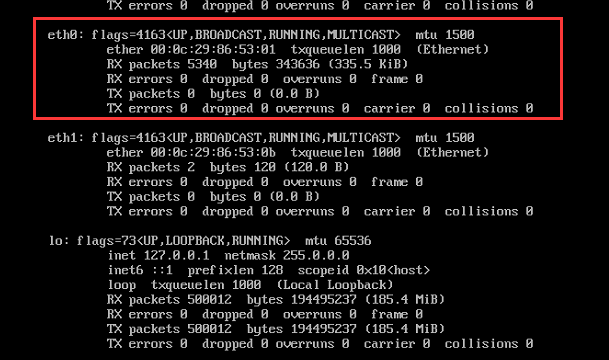
Login to the console of the virtual CC, found out that eth0 does not have IP address.
-
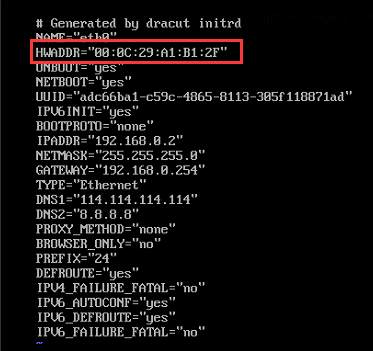
Proceed to check /etc/sysconfig/network-scripts/ifcfg-eth0, found out that the MAC address is different from ifconfig.
-
Proceed to change the MAC address in /etc/sysconfig/network-scripts/ifcfg-eth0. From 00:0C:29:A1:B1:2F to 00:0C:29:86:53:01.
-
Restart the network process, systemctl restart network
Root Cause
Found out that the MAC address of eth0 changed, therefore the web UI is unable to be access
Solution
Change the MAC address to the same MAC address in ifconfig