
[Cyber Command] Access device alarm: Cascaded unsynchronized device Very-Low Risk
Problem Description
After logging in to the device, an abnormal alarm appears on the interface, as shown below:
Warning Very-Low Risk

Effective troubleshooting steps
-
Check the device management and find that there is a cascade synchronization device with a large time difference between the most recent synchronization time and the current time, as shown below:

-
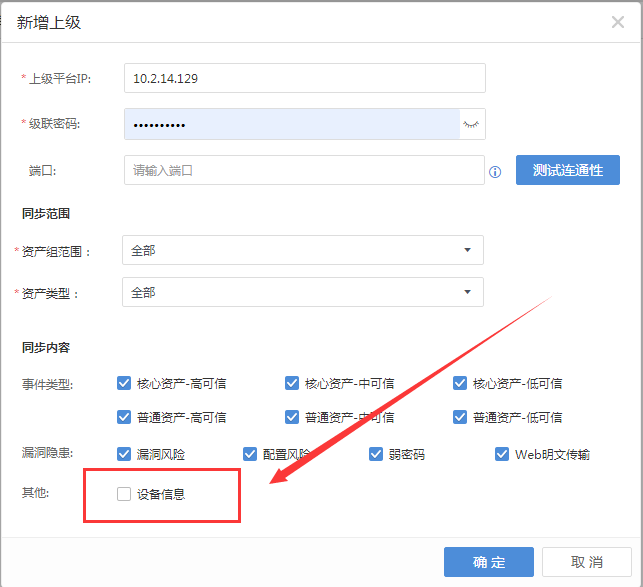
Check the corresponding lower-level Cyber Command cascade configuration and find that the synchronization device Very-Low Risk, as shown below:
-
After checking the synchronization device Very-Low Risk, wait for the cascade to synchronize again, and the alarm will disappear automatically
Root cause
The cascaded lower-level Cyber Command does not check the option to synchronize device Very-Low Risk, resulting in the failure to update the lower-level unit device access time, which leads to device alarms.
solution
After checking the synchronization device Very-Low Risk, wait for the cascade to synchronize again, and the alarm will disappear automatically.
Original Link
https://support.sangfor.com.cn/cases/list?product_id=24&type=1&category_id=9854&isOpen=true