
[Cyber Command] After clicking OK on the large screen visual setting, the prompt: Submission error, guarantee start time => This input item is required
Problem Description
After setting in [Monitoring Center] – [Large Screen Visibility], click OK, and a prompt will appear: Submission error, guarantee start time => This input item is required.
Warning Very-Low Risk
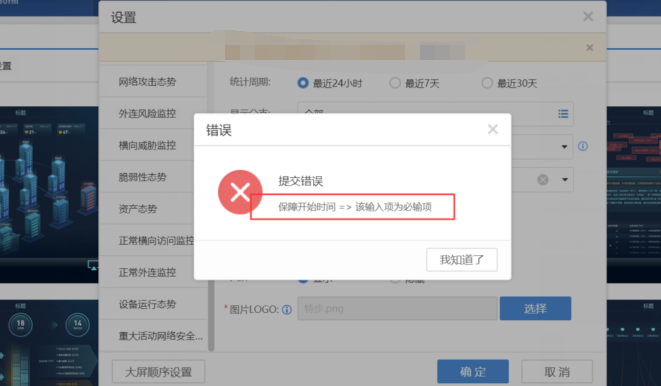
884305e4a55f4b0259.png (111.31 KB)
Process——
- After logging in with Google Chrome and resetting it, the same error message still appears.
- In [Monitoring Center] – [Large Screen Visualization] – [Settings] – [Major Event Network Secure Command and Dispatch Large Screen] – [Security Start Time], click the log on the right, select the date, and click OK without any error message.
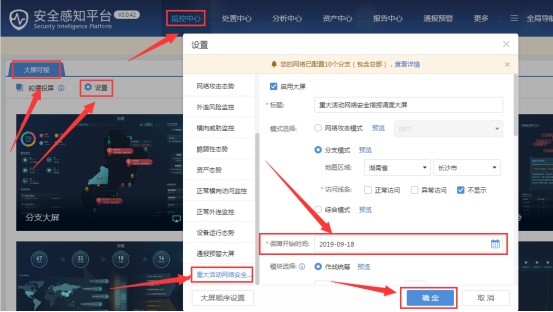
690505e4a58cc6c765.png (105.41 KB)
Root cause
The guarantee start time must be set.
solution
Just set the time in [Monitoring Center] – [Large Screen Visualization] – [Settings] – [Major Event Network Security Command and Dispatch Large Screen] – [Security Start Time].
Suggestions and Conclusion
It is recommended to use Google Chrome to log in to the Cyber Command console.
Original Link
https://support.sangfor.com.cn/cases/list?product_id=24&type=1&category_id=9781&isOpen=true