
Cyber Command Asset scanning configuration scanner cannot display STA version is too low
Problem Description
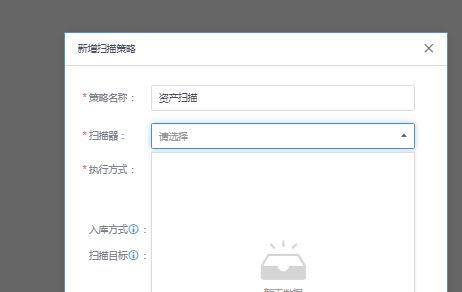
When Cyber Command configures Asset scanning and checks the scanner, it is displayed as empty and the corresponding STA STA cannot be selected
Warning Very-Low Risk
Effective troubleshooting steps
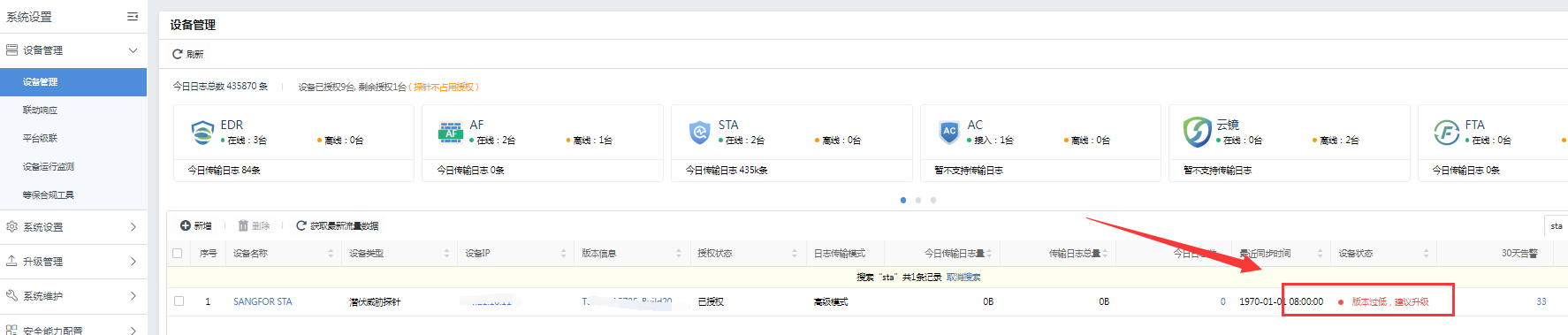
- Check the device access status. The Cyber Command interface shows that the STA STA version is too low.
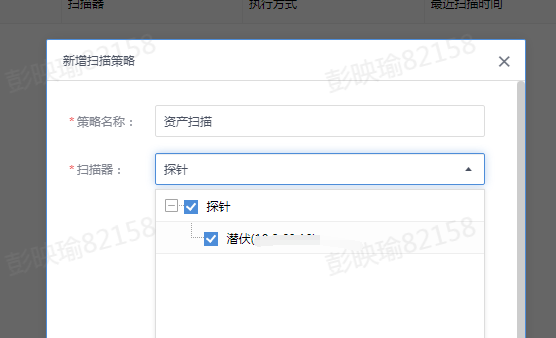
- Upgrade STA STA to the corresponding version, and then select the corresponding STA STA for Asset scanning configuration
Root cause
STA STA version is too low to be selected.
solution
Upgrade STA to the corresponding version to solve the problem
Operation Impact Scope
STA upgrade will restart the device and will not affect services
Suggestions and Conclusion
The STA version corresponds to the Cyber Command version one by one. If you upgrade Cyber Command and the Cyber Command interface prompts that the STA version is too low, it is recommended to upgrade STA in time.
Original Link
https://support.sangfor.com.cn/cases/list?product_id=24&type=1&category_id=9967&isOpen=true