
[Cyber Command] Linkage IAG test authentication failure caused by cache
Problem Description
Cyber Command configuration linkage IAG, configure access account and password, click test to prompt authentication failure
Warning Very-Low Risk
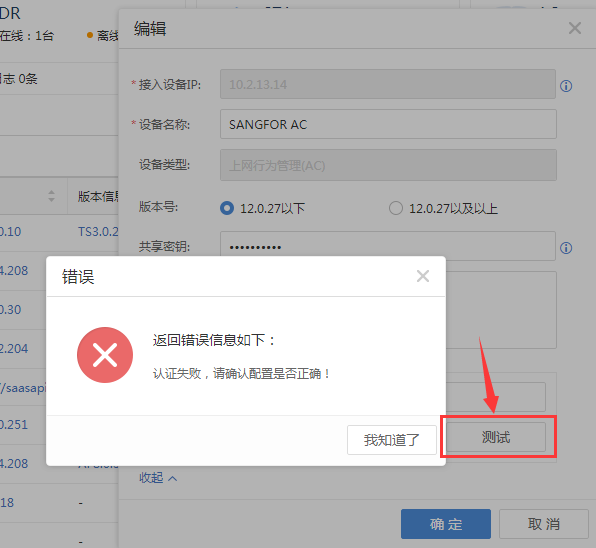
Effective troubleshooting steps
-
Confirm that the authentication account and password on Cyber Command and IAG are consistent
-
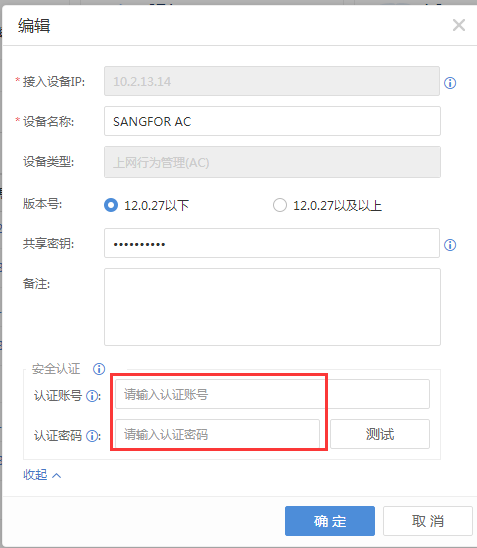
After configuring the authentication account and password of the corresponding IAG on Cyber Command and clicking Save, click to view again and it is still empty, as shown below:
-
After deleting the corresponding AC device in Cyber Command's [System Settings] – [Device Management] and reconfiguring it, the test is normal
Root cause
Cache causes the generated auth verification code to be abnormal
solution
After deleting the corresponding AC device in Cyber Command's [System Settings] – [Device Management] and reconfiguring it, the test is normal
Original Link
https://support.sangfor.com.cn/cases/list?product_id=24&type=1&category_id=9836&isOpen=true