
[Cyber Command] STA upgrade prompt: Software upgrade serial number verification failed (errno:41)
Problem Description
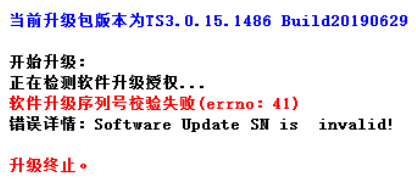
STA upgrade failed, prompting: Software upgrade serial number verification failed (errno:41).
Warning Very-Low Risk
696375d513e79bc9e5.png (24.17 KB)
Process——
- The upgrade failed using the upgrade client. The same prompt appears when trying to upgrade again.
- Log in to the STA console and check [System]–>[System Configuration]–>[Serial Number]–>[Upgrade Serial Number] to find that the software upgrade serial number has expired.
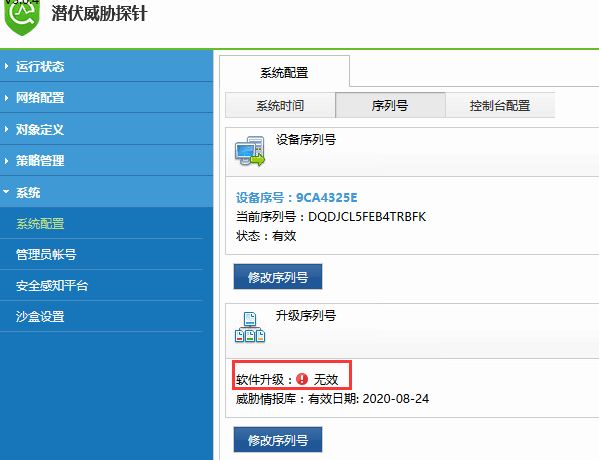
630015d513f696faa8.png (45.7 KB) - Call the pre-sales hotline 400-806-6868 to re-activate the software upgrade authorization. Re-enter the valid upgrade serial number in [Modify Serial Number] and use the upgrade client again to upgrade normally.
Root cause
The upgrade serial number has expired.
solution
Enter a valid upgrade serial number.
Suggestions and Conclusion
When upgrading STA, be sure to check whether the software upgrade is out of date.
Original Link
https://support.sangfor.com.cn/cases/list?product_id=24&type=1&category_id=9772&isOpen=true