
[Cyber Command] The security center does not display the log content of NGAF synchronization
Problem Description
In the Cyber Command console's [Security Center] – [Adversary Guard] – [Real-time Attack Analysis], there is no NGAFsynchronized attack data.
Effective troubleshooting steps
- Filter AF logs separately in log search to confirm that NGAF has synchronized related WEB logs
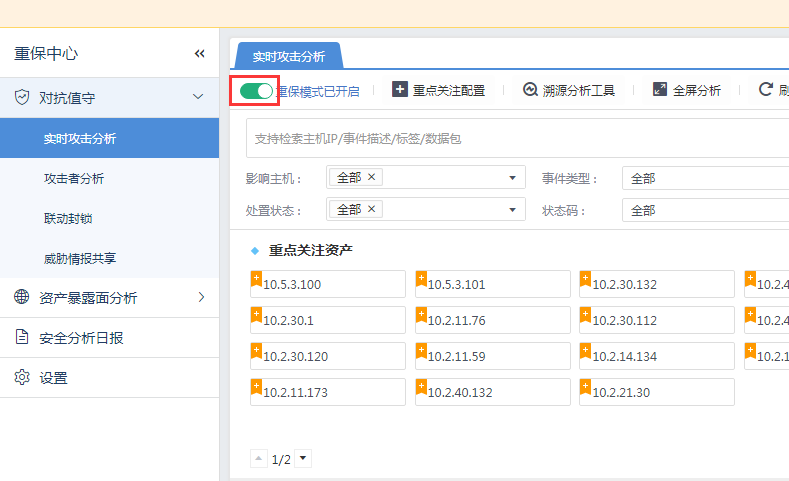
- In [Counterattack Guard] – [Real-time Attack Analysis], confirm that the heavy protection mode has been turned on, as shown in the following figure:
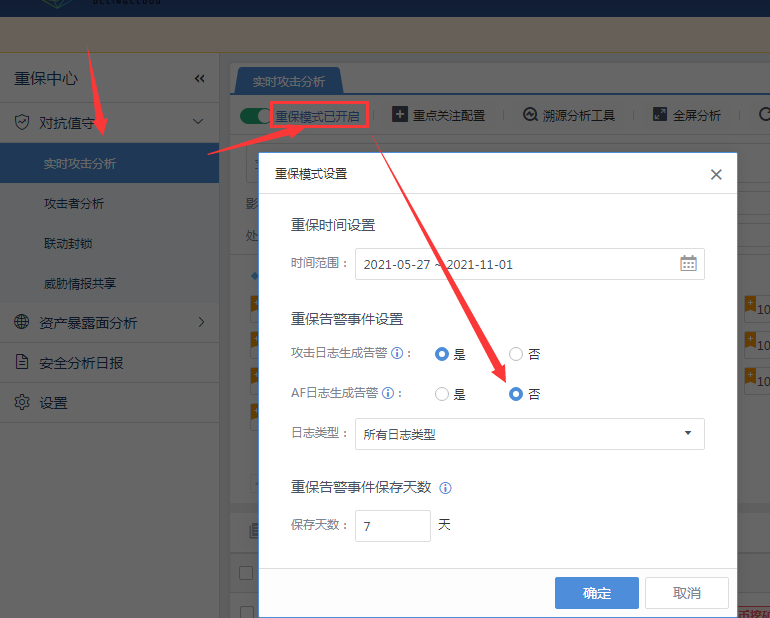
- In [Adversary Guard] – [Real-time Attack Analysis], click "Reinforcement Mode is On", and find that the "NGAF Log Generation Alarm" option is not checked in the settings.
solution
After selecting "Yes" for "Generate Alarm for NGAF Log" and submitting the confirmation, the NGAF data will be displayed normally in the health care center.
Original Link
https://support.sangfor.com.cn/cases/list?product_id=24&type=1&category_id=9894&isOpen=true