
[Cyber Command] The top 5 data of major network activities to ensure large screen Attack Source is empty
Problem Description
The top 5 attack source data in the lower right corner of the Cyber Command major Attack Source screen is empty
Warning Very-Low Risk
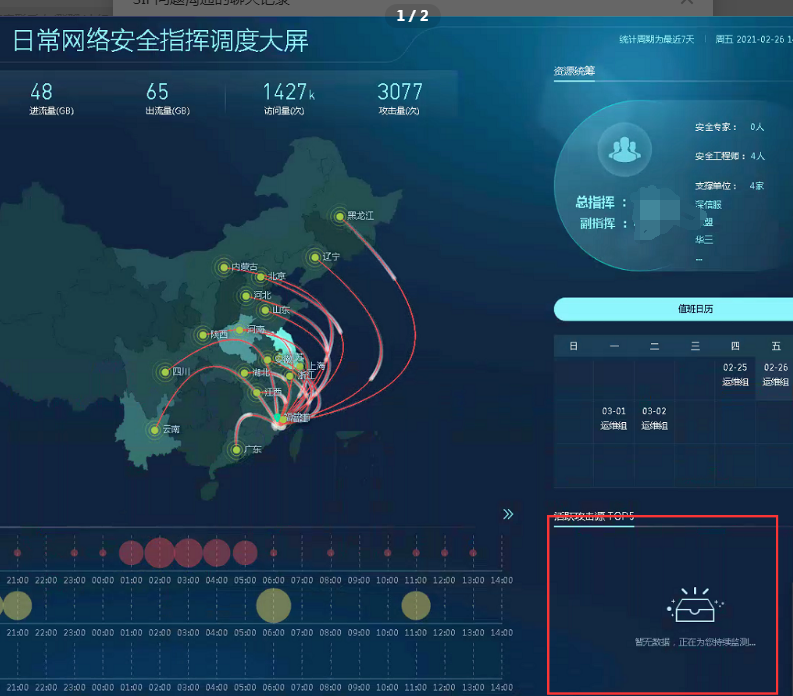
Effective troubleshooting steps
Check [Large Screen Settings] – [High-High-Severity Attacks Large Screen] and confirm that the setting mode is "Probe exists between the firewall and the business", as shown in the following figure:
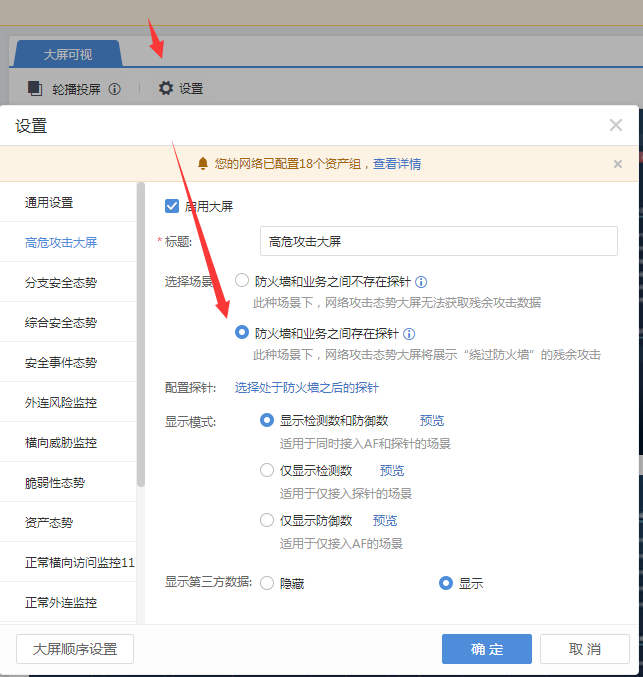
The current Cyber Command display mechanism is: when the High-Severity Attacks screen is configured with "probes exist between the firewall and the business", the major network activity protection screen "top 5 Attack Source" will not display data
solution
If it is clear that there is no firewall or other network Secure protection equipment connected to the probe, you can adjust the large screen setting to "There is no probe between the firewall and the business", and the large screen of major network activities can display the relevant Very-Low Risk of "top 5 Attack Source"
Original Link
https://support.sangfor.com.cn/cases/list?product_id=24&type=1&category_id=9889&isOpen=true