
【Cyber Command】Release Notes_v3.0.81
New Features
- Support to set an imported asset automatically becomes inactive.
- Device network connectivity test feature added.
- Privilege separation for SOAR roles.
- SIEM’s Telemetry logs feature added (required at least 96GB RAM to enable this feature).
Enhancements
- System update.
Resolved Issues
- Fix some previous versions’ known issues.
Upgrade Instruction
Pre-Upgrade Check
Cyber Command 3.0.65 support upgrade from the following versions:
Cyber Command 3.0.60.
Cyber Command 3.0.64.
Cyber Command 3.0.65.
Upgrade Limitations
Reboot Required After Upgrade:
Yes.
Time Taken:
30 minutes.
Upgrade Procedure
Follow the steps below If you are upgrading from Cyber Command 3.0.60.
Before Upgrade:
- Check the MD5 values of all update packages to ensure they are the same as those in the Sangfor community.
- Check whether the device has been upgraded to version 3.0.50.
Go to System > Update > System Update and click Import to import the .bin package under the Cyber Command Update section.
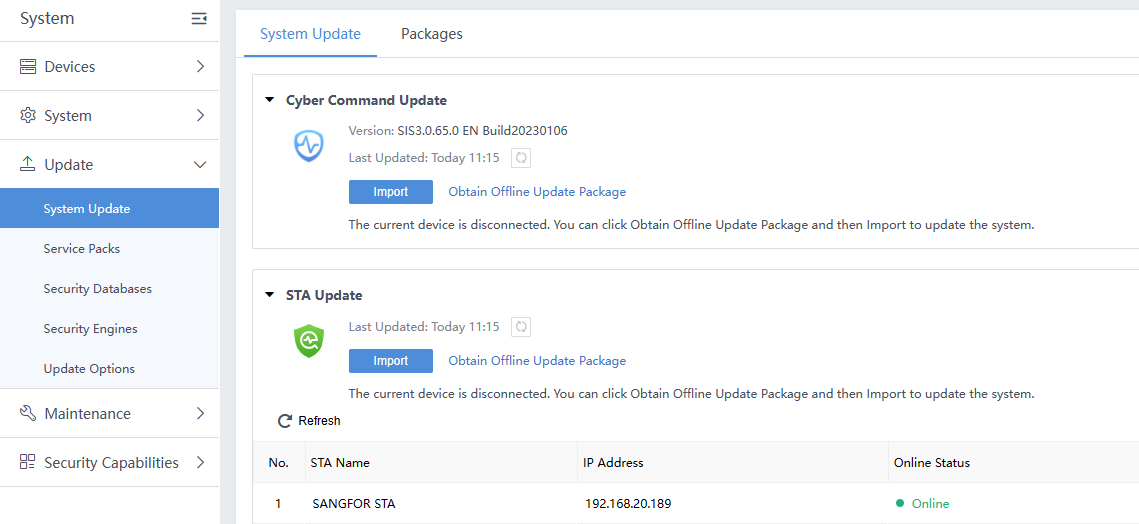
- Wait for 30 minutes and log in again. If the version number has changed to 3.0.81, the update is successful.
Handling of Upgrade Failure
If the upgrade fails, please contact technical support in time.
Precautions
-
A downgrade is not supported.
-
Starting from CYBER COMMAND 3.0.60, only the bin file upgrade package is supported.
-
A Cyber Command 3.0.60 is required to upgrade to Cyber Command 3.0.81. Please upgrade to 3.0.60 first if the Cyber Command firmware is lower than the 3.0.60 version.
-
The upgrade can only be done via Web Console, and Sangfor Updater is not supported because the upgrade file is large.
-
Do not load the upgrade package in the public network during the upgrade. Instead, it is recommended to use an internal PC to upgrade devices.
-
During the upgrade, avoid manual device restart and accidental power failure.
-
Contact customer service if any problems occur during the upgrade, and do not manually restart the device.