
Antivirus Database is not updated on the ES Manager
Issue Description
Endpoint Secure manager is not updating the Antivirus Database and Engines.
Able to import the virusdb manually, but it is not a proper solution as virusdb is updated frequently.
Error/Warning Information
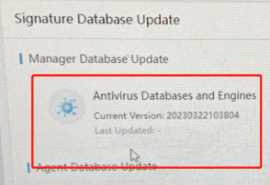
The ‘Last Updated’ info appears blank.
Handling Process
-
Verify that Endpoint Secure manager able to ping and resolve the following hostnames.
auth.sangfor.com , upd.sangfor.com , download.sangfor.com -
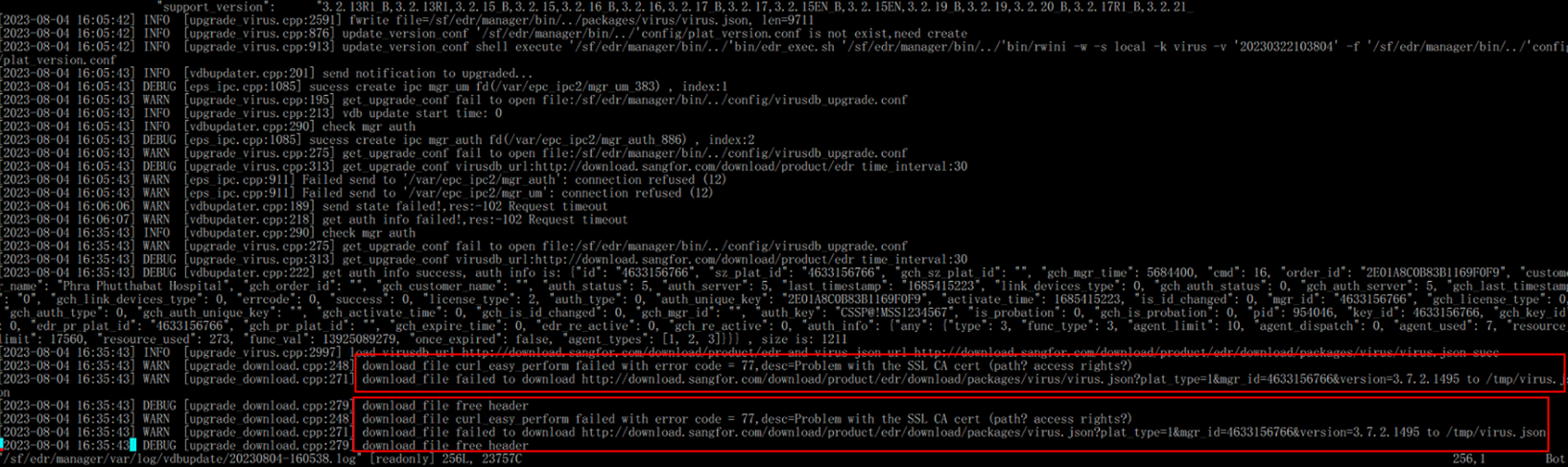
Check the following log.
/sf/edr/manager/var/log/vdbupdate/
-
Found that there is multiple errors of "failed to download http://download.sangfor.com/down … /virus/virus.json.."
Root Cause
Download server had been changed from http to https.
Solution
[New Solution]
- Install the patch
edr_custom_i_virus_domain_EDR-202308201853_20230822185851.pkg
[Old Solution]
-
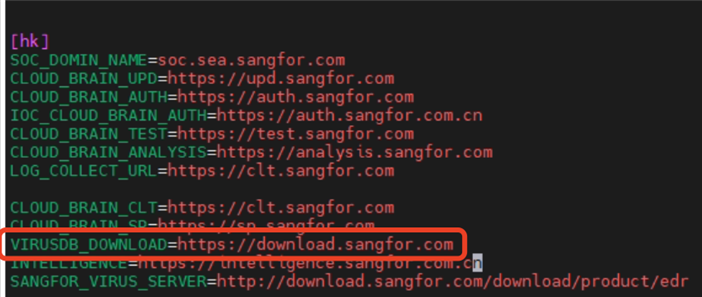
Modify the following file sfe_cmn_domain_cfg.ini.
Command:vim /sf/edr/manager/config/sfe_cmn_domain_cfg.ini -
Edit the following line to change the VIRUSDB URL from http into https.
VIRUSDB_DOWNLOAD=http://download.sangfor.com -> VIRUSDB_DOWNLOAD=https://download.sangfor.com
Note:
Pay attention to the line under the [hk] section and not the [cn] section. -
Restart the virusdb service.
Command:/sf/edr/manager/bin/eps_services restart upgraded
Note:
After restart the service, check the vdbupdate log again to see if there is new logs generated and does it still showing the same logs as previous.
If the new logs still showing "failed to download http://download.sangfor.com/xxxx" it means the changes are not effective. Use the following command to restart service:
Command: /sf/edr/manager/bin/eps_services restart
Suggestions
File : edr_custom_i_virus_domain_EDR-202308201853_20230822185851.pkg
MD5: 3ce7c3883d59bbbcea9029391c5c12b9