Configure IP address for ES Manager (backend)
Issue Description
Newly deployed ES Manager uses default IP address and it is inconvenient to access using default IP.
Error/Warning Information
Handling Process
-
Access the ES Manager backend.
-
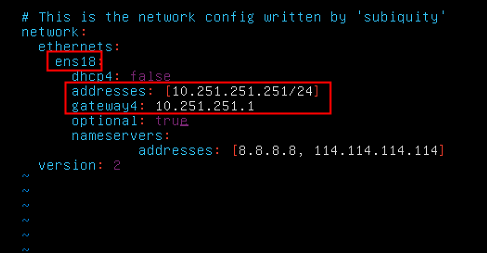
Modify the 00-installer-config.yaml config file.
Command:vim /etc/netplan/00-installer-config.yaml
Note:
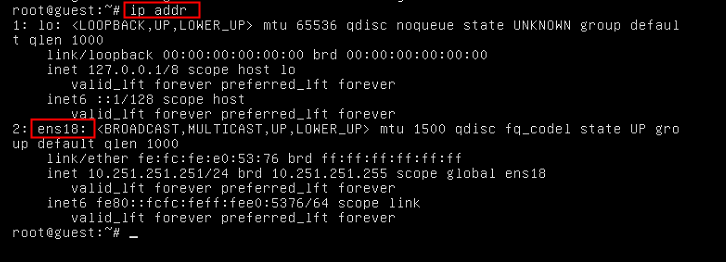
a) Must ensure the NIC name matches the result of ‘ip addr’, or else the configuration does not takes effect.
Modify the IP address and Gateway. -
After configured the network configurations, execute the following command to take effect.
Command:
ip link set up ens18
netplan apply

-
The IP address had been configured successfully.
Solutions
Modify /etc/netplan/00-installer-config.yaml to change the IP address of ES Manager.
Suggestions
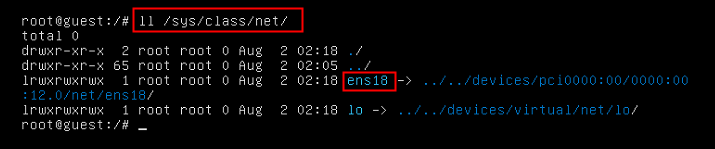
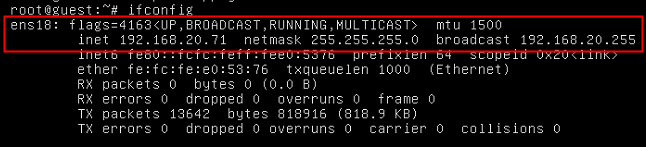
If you do not see the NIC from ‘ifconfig‘ or ‘ip addr‘, please use ll /sys/class/net/ and manually enable the NIC.
Command:ifconfig ens18 up