
Endpoint Secure Manager password reset
Issue Description
User had forgotten the admin password of Endpoint Secure Manager and unable to login.
Important:
The following method will remove all existing sub-admin accounts.
Error/Warning Information
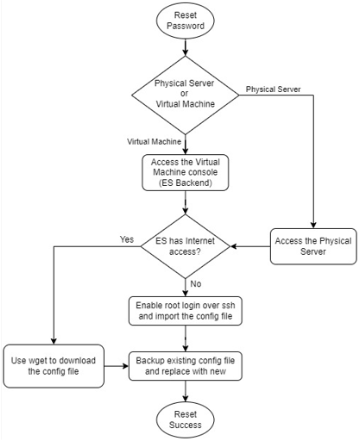
Handling Process
Step 1: Access the backend of Endpoint Secure Manager
[Physical Server]
a. Connect to the physical MGR server by console cable with baud rate 115200.
b. In some cases, the physical server can only be operated physically by keyboard/mouse.
[Virtual Machines]
a. Login to the Virtual Platform and launch the Endpoint Secure virtual machine console view.
Step 2: Login the backend console.
| Version | Username / Password |
|---|---|
| 3.7.12 & above | root/great@cause |
| 3.5.36, 3.7.2 | Scan QR code and contact TAC |
| Older version | root/edr@sangfor |
Step 3: Import / download the new sys_account.json file into the Endpoint Secure manager.
[ES Manager with Internet access]
a. Directly download the new sys_account.json file using the following command.
Command:
wget -P /tmp/ https://download.sangfor.com/download/product/es/sys_account_3.5.10.json
[ES Manager with NO Internet access]
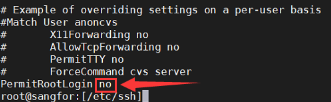
a. Enable root login over ssh by changing "PermitRootLogin no" to "PermitRootLogin yes".*
Command: vi /etc/ssh/sshd_config
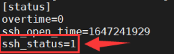
b. Enable ssh service by changing the ssh_status from ssh_status = 0 to ssh_status = 1. *
Command: vi /sf/edr/manager/config/listen_config.ini
c. Restart sshd service.
Command: /etc/init.d/sshd restart
d. Login to ES Manager using MobaXterm and upload the sys_account.json into /tmp/ directory.
Important:
*Must revert the changes and restart service on final step to prevent the ES Manager at security risks.
Step 4: Reset the admin password.
a. Make a backup of the existing config file.
Command:
cp /ac/dc/config/sys_account.json /ac/dc/config/sys_account.json.bak
b. Replace the config file.
Command:
cp /tmp/sys_account_3.5.10.json /ac/dc/config/sys_account.json
Step 5: Login to ES Manager webui with the following username and password: admin / GreatSF@123
Step 6: Change the admin password on webui. (Must change)
Root Cause
User had forgotten the Endpoint Secure admin password.
Solution
Reset the admin password by replacing the config file.
Suggestions
Note:
If you are unable to login the backend, try create a new user from ES backend console and login using the new user.
Command:
setenforce 0                           (Temporarily turn off SELinux mode)

useradd -G root -g root test123        (Create an account 'test123' and add it to the root group)

passwd test123                         (Configure a password. Eg: '@Debug123')

userdel test123                        (Remove the 'test123' account)
Info:
Attached sys_account.json file is for (version <=3.5.5) and (version >=3.5.10) respectively.
MD5 value of 3.5.5 sys_account.json: A9EA88741D841E62B6703A0451D86FE3
MD5 value of 3.5.10 sys_account.json: 5A6C13D5CF822CF7FDBE5C3AB3D6031B