
[ES] Case Study: ES Unable to Detect Virus in Windows Terminal C&C Communication
Problem Description
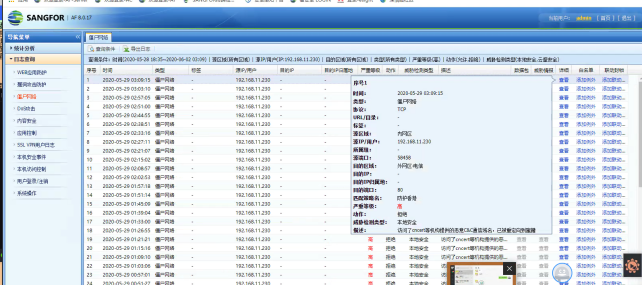
The host is being alerted for C&C communication, accessing pool.minexmr.com, but the ES scan did not detect any virus files, as shown in the following image:
Effective Troubleshooting Steps
- Analyze the domain name, pool.minexmr.com is a commonly used mining pool domain name, excluding the possibility of false positive AF.
- It is clear that this host is just a regular PC, not a DNS server or domain controller in a proxy environment.
- ES full scan verification, no virus files found
- Use the zombie network kill tool threat detection function to search for the domain name, and locate the associated process files as shown in the following figure:
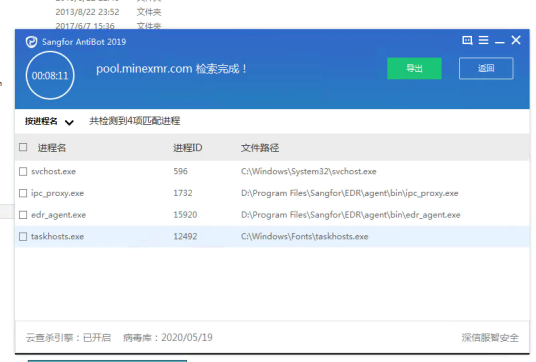
From the figure, you can see 4 related processes and their corresponding file paths. Among them, ipc_proxy and ES_agent are ES processes, svchost is a system process, and taskhosts is not a system process file, with a high suspicion.
- By copying the taskhosts file to a third-party platform for analysis, it was found that the file had a large number of virus detections, including sample labels containing the field CoinMiner, indicating a high possibility of being a mining virus.
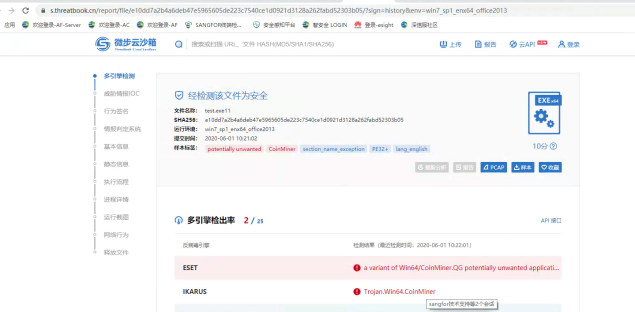
- Submit file sample information to the ES security team for analysis, and finally confirm that it is a mining virus for storage and processing.
Solution
Troubleshooting Steps
Suggestions and Summary
If the host has malicious domain access behavior but the ES cannot detect the virus, you can follow the steps below to investigate.
- Determine if the domain name is malicious, excluding false positive.
- Confirm whether the host is a domain controller, DNS server, or other proxy environment, and determine the true source of access.
- Confirm if ES has added a trusted path, ES full disk antivirus.
- In cases where the virus cannot be killed, use anti-zombie network killing tools to analyze the processes and files associated with the corresponding domain names.
- Analyze relevant files, locate suspicious virus files, upload them to third-party websites for preliminary judgment of whether they are virus files, and provide them to the security team for further analysis and storage.
Original Link
https://support.sangfor.com.cn/cases/list?product_id=16&type=1&category_id=2680&isOpen=true