
[ES] Centos server installation ES Agent error: cron not found
Problem Description
Error occurred while installing ES agent on Centos server. The error message states "Unable to find cron." ES needs it to keep ES running properly.
Alarm Information

223225e4f4587d28c7.png (44.49 KB)
Process –
- Log in to the Linux server and execute the installation script, which prompts that cron cannot be found.
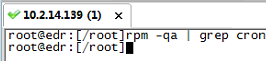
- Execute rpm -qa | grep cron to confirm that there is no cron.
576035e4f480d1ea60.png (10.83 KB)
Root Cause
ES installation requires the cron service. Without installing cron, the installation script did not pass, resulting in an installation error.
Solution
Install cron on the server, and then execute the installation script to install ES. The server can access the Internet, and cron installation can be done online. If the server cannot access the Internet, the installation package can be downloaded offline and installed manually.
Install cron online: Command reference: yum install cron*
Manual offline installation package download (Linux mirror website https://mirrors.aliyun.com/centos/)
Manual offline installation command: rpm -ivh package name (rpm package)
Original Link
https://support.sangfor.com.cn/cases/list?product_id=16&type=1&category_id=2510&isOpen=true