
[ES] Centos server installation ES agent error: wget is not installed
Problem Description
Error occurred while installing ES agent on Centos server. The error message indicates that wget command is not installed.
Alarm Information
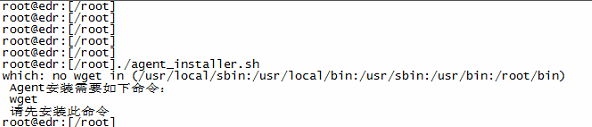
753785e4e23c916dca.png (41.61 KB)
Process –
- Log in to the Linux server, execute the installation script, and receive a prompt indicating that the wget command is not installed.
- Run the command "rpm -qa | grep wget" to check if the command is not installed.

658255e4e248c57632.png (10.33 KB)
- Install the wget command on the server, then execute the ES installation script to test the successful installation of the ES agent.
Root Cause
wget is not installed, the script failed the check and an error occurred.
Solution
Install wget on the server, then execute the installation script to install ES. The server can access the external network, and wget installation can be done online. If the server cannot access the external network, the installation package can be downloaded offline and installed manually.
Install wget online: command reference: yum install wget
Manual offline installation package download (linux mirror official website https://mirrors.aliyun.com/centos/)
Manual offline installation command: rpm -ivh package_name (rpm package)
Original Link
https://support.sangfor.com.cn/cases/list?product_id=16&type=1&category_id=2500&isOpen=true