
[ES] Centos server installation of ES Agent error: insufficient memory, less than 500M.
Problem Description
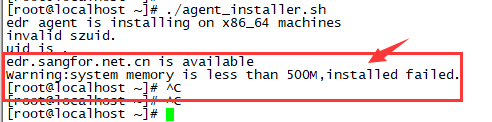
The installation of the ES agent on the Centos server failed with the message "system memory is less than 500M, installed failed".
Alarm Information
753005e4f579ad49fc.png (11 KB)
Process –
- Log in to the Centos server, run the installation script, and receive a prompt that there is insufficient memory (less than 500M). Execute the command "free -m" to check the memory and confirm that it is indeed less than 500M.

94315e4f57eaa8187.png (13.65 KB)
Root Cause
The memory does not meet the installation requirements of the agent. You need to have more than 500MB of available memory to install it.
Solution
- Adding more memory to the server may affect its usage. It is recommended to backup the server before performing any operations and to do so at a convenient time for the business.
- Release idle memory on the server by executing "echo 3 > /proc/sys/vm/drop_caches". It is recommended to perform this operation when the business is idle.
Suggestions and Summary
The server on which the ES agent is installed should have at least 500M of remaining memory.
Original Link
https://support.sangfor.com.cn/cases/list?product_id=16&type=1&category_id=2512&isOpen=true