
[ES] Centos system offline installation ES Manager error: IPV6 not enabled.
Problem Description
An error occurred during the installation of the ES Manager center terminal, with the message "You should enable ipv6 before install manager".
Alarm Information

827695e4a42a9bd69f.png (50.88 KB)
Process –
- Based on the error message, it is determined that IPv6 is not enabled.
- Modify the system configuration file to enable IPv6.
Root Cause
The installation script will check if IPv6 is enabled.
Solution
- Modify the sysctl.conf configuration file under the /etc/ directory (Note: Make sure to backup the file before modifying the configuration file)
- Set the disable settings related to ipv6 in the configuration file sysctl.conf to 0, as shown in the figure below. Change the value of the parameter in the box in the figure from "1" to "0" and save it.
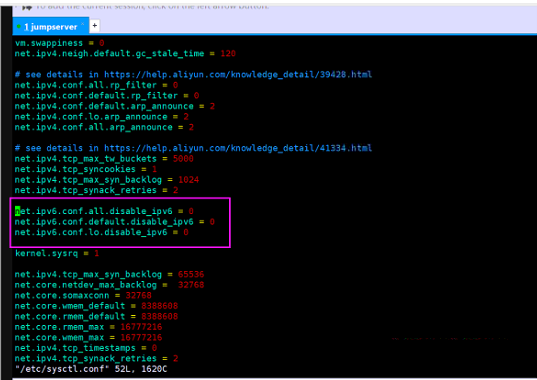
826535e4a43dec24ff.png (94.27 KB)
- Execute sysctl -p to apply the configuration.
Original Link
https://support.sangfor.com.cn/cases/list?product_id=16&type=1&category_id=2490&isOpen=true