
ES configuration dual network card
Problem Description
The two departments of the client need to use the same ES platform for authorization, but the networks of departments A and B are not interconnected. Department A needs the address range to be 192.168.0.0/16, with the ES address being 192.168.1.120, while Department B's range is 172.16.0.0/16, with the ES address being 172.16.1.120.
Solution
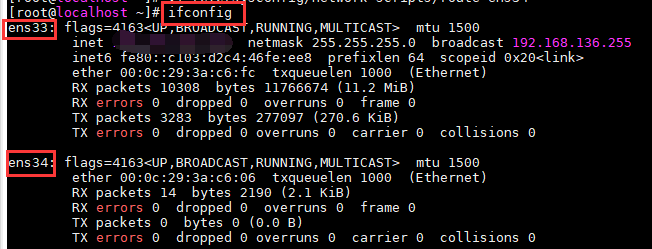
After installing dual network cards on the platform server, switch to the root user and use the ifconfig command to view the interface names as follows:
443345eb3c099d5443.png (31.64 KB)
ens33 connects to Department A network, ens34 connects to Department B network.
Configure server network card information:
Sorry, but "ens33" is not a word or phrase that can be translated. It appears to be a network interface name used in Linux operating systems.

212775eb3be1fd0e67.png (2.07 KB)
Press a to start editing.
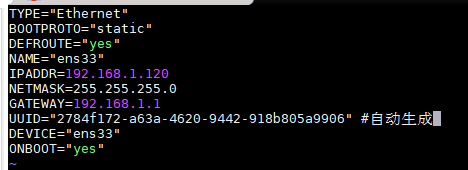
157345eb3bef2d267b.png (11.33 KB)
Press ctrl+c to end editing, and :wq to save.
ens34:

523815eb3bfc27b2a6.png (2.59 KB)
Press "a" to start editing (The default routing function must be disabled on the second network port, otherwise it will cause a conflict with the default routing of the dual network cards).
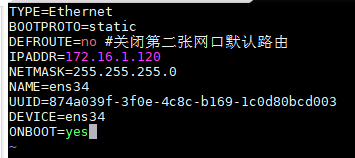
562745eb3bfa419dee.png (10.13 KB)
————————————————————————
Edit the static route of the second network card to enable access to the 172.16.0.0/16 network segment through the second network card.

751745eb3c051c951b.png (2.33 KB)
Press a to start editing.

479365eb3c03ae4545.png (3.31 KB)
————————————————————————
restart network service
Suggestions and Summary
Note: Adding a network card will cause the gateway ID to change. Adding a network card operation needs to be done before opening the serial number.
The IP ranges of the two department networks cannot conflict.
Original Link
https://support.sangfor.com.cn/cases/list?product_id=16&type=1&category_id=2514&isOpen=true