
[ES] ES installation failed on Mac computer.
Problem Description
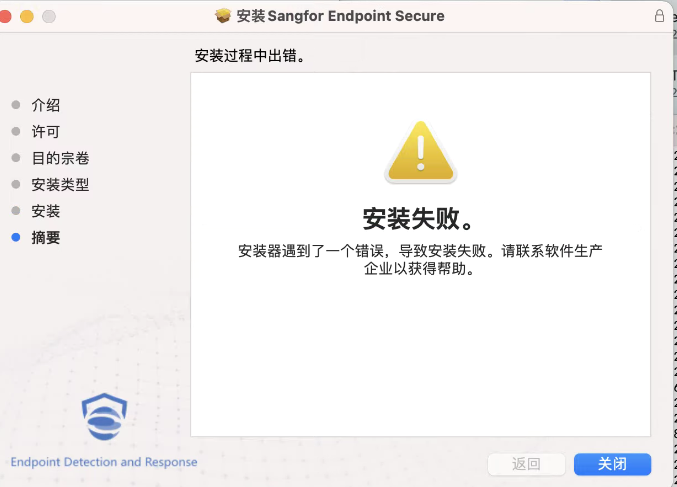
Failed to install ES on a Mac computer, the error message is as follows: (usually only this type of error message)
Effective Troubleshooting Steps
Reason 1: Version not supported
Starting from version 3.5.10, the ES client installation is supported on the Mac system. As of the current latest version 3.5.20, the support situation for each version is as follows:
3.5.10-3.5.16: Supports MacOs 11.0/10.13/10.14/10.15, only has a status bar icon, no interface displayed.
3.5.18-3.5.30: Support MacOs 12.0 on top of the above and display the interface.
Reason 2: Port Unreachable
Open "Terminal" and use the command to test the connectivity of ports 443/8083/54120 to the ES management platform. The command to test the connectivity of port 443 is as follows:
_nc -vz -w 2 192.168.1.1 (change to the corresponding local ES Manager IP address) 443
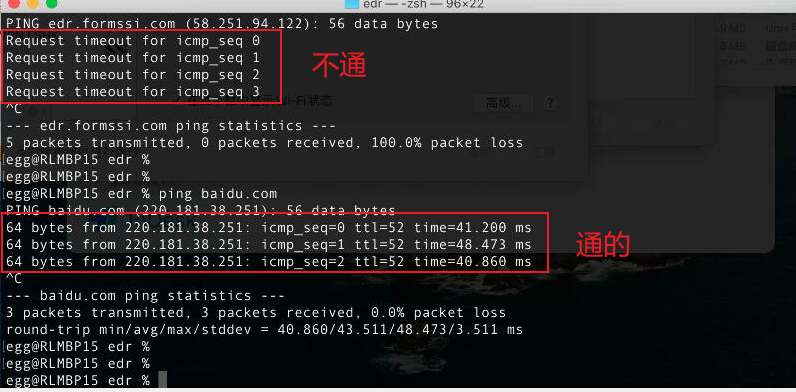
Reason 3: Ping Test Failed
When installing on a Mac terminal, there will be a ping detection. If the gateway device prohibits ping, it will cause installation failure. If there is a prohibition on pinging in the internal network, it needs to be allowed first. The test example is shown in the following figure:
Reason 4: There are residual files.
- Open "Terminal", enter "sudo -i" and input the lock screen password to switch to the root user.

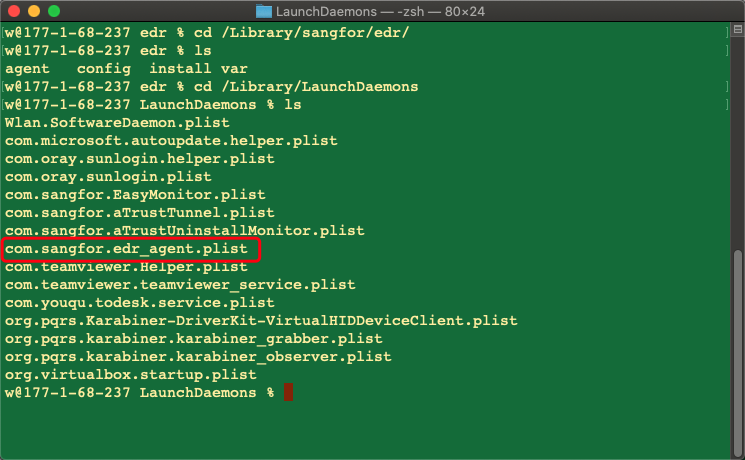
- cd /Library/sangfor/ES_, ls to check if there are any agent config var folders, if there are, delete the ES folder directly.

- cd into /Library/LaunchDaemons/ and check if there is a file named com.sangfor.ES_agent.plist. If it exists, delete it and reinstall again.
Solution
The command line operations on Mac are basically the same as on Linux, such as: rm -rf, cd, ls, cat and other commands.
Original Link
https://support.sangfor.com.cn/cases/list?product_id=16&type=1&category_id=2562&isOpen=true