
[ES] ES Manager virus library not automatically updated due to ES Manager server DNS not configured.
Problem Description
The customer reported that the ES ES Manager platform has been deployed, and the platform can also access the internet. However, it was found that the virus library version of ES Manager did not update automatically, and the reason needs to be analyzed.
Process –
- Log in to the ES Manager server via SSH and test the connectivity to the external network using ping. The test was successful and able to ping (note: tested with 114.114.114.114).

404715e4b6bbb2c54f.png (8.11 KB)
- Check the DNS configuration file of the server and found that the file is empty, inferring that the failure to update the virus database is due to the inability to resolve the domain name.

340935e4b706035791.png (5.52 KB)
- By checking the virus library update log, it is further confirmed that the DNS resolution is the cause.
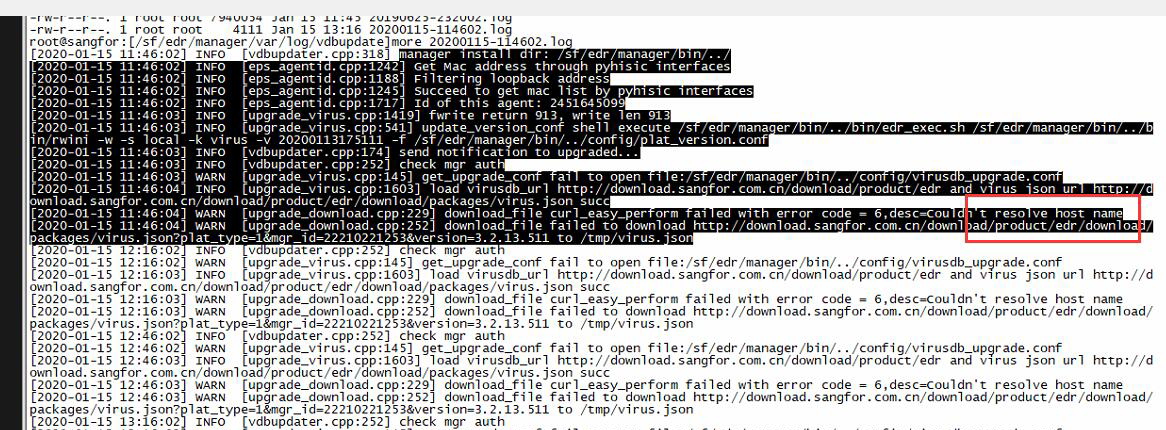
289755e4b71113c1a2.png (893.27 KB)
- Configure the DNS address for ES Manager, then perform a test to ensure that the virus database is updated correctly.
Root Cause
The ES Manager server is not configured with DNS, which leads to the inability to resolve the domain name, resulting in the failure of virus database updates.
Solution
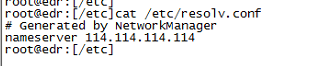
Configure DNS address on the ES Manager server (DNS configuration method, modify the /etc/resolv.conf file, remember to backup the file before modifying it), as an example of configuring DNS as 114.114.114.114, as shown in the following figure:
150835e4b94b93f24f.png (16.17 KB)
Suggestions and Summary
The virus library on the ES central end needs to be automatically updated to ensure that the server can access port 80 of download.sangfor.com.cn.
Original Link
https://support.sangfor.com.cn/cases/list?product_id=16&type=1&category_id=2489&isOpen=true