
[ES] Event Viewer Alert 4723 Event for Windows event
Problem Description
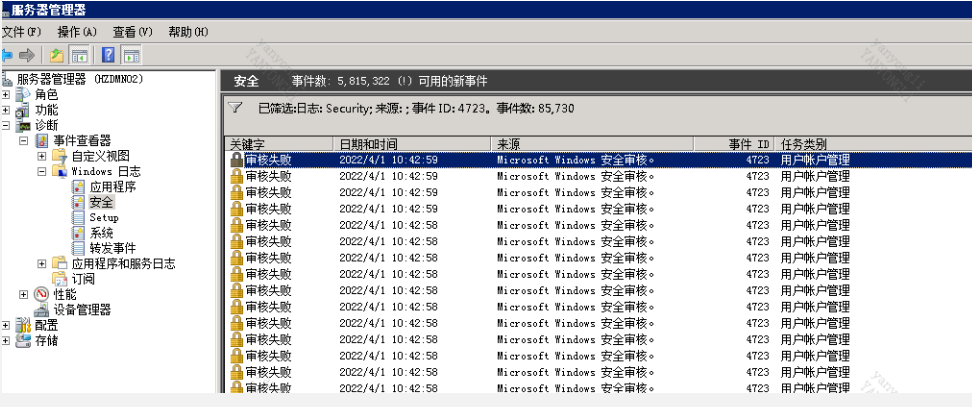
The Windows server has installed the agent, and the event viewer has been continuously alerting the 4723 event
Alarm Information
Effective Troubleshooting Steps
- The terminal data collection settings for ES Manager are set to execute every 24 hours by default; check the 4723 event generation interval on the Windows server to be 24 hours.
- Change the terminal data collection setting time of ES Manager to 2 days; observe that the interval for generating event log 4723 on the Windows server becomes 48 hours instead of 24 hours. It can be judged that the terminal data collection function of ES is the cause.
Root Cause
The weak password detection mechanism in ES weak password collection. This feature will detect weak password through password collision behavior. During the collision process, the netusersetinfo function is called, which attempts to modify the user's password, but does not actually change the password. This process will be recorded as a 4723 log by the system. Due to the large number of tests, a large amount of 4723 logs will be generated, which is triggered by the internal mechanism of the ES software.
Solution
- If the corresponding log does not affect the functionality, it can be ignored by the user.
- If the user does not want to see the corresponding event, they can upgrade the corresponding optimization package in ES Manager to disable weak password detection function.
ES 3.5.18 version: ES_custom_i_weak_pwd_ES-2022030316_20220304000052.pkg
Scope of Operation Impact
After updating the optimization package, the ES AGENT on the terminal will be upgraded, and weak password on the terminal will no longer be detected.
Original Link
https://support.sangfor.com.cn/cases/list?product_id=16&type=1&category_id=2703&isOpen=true