
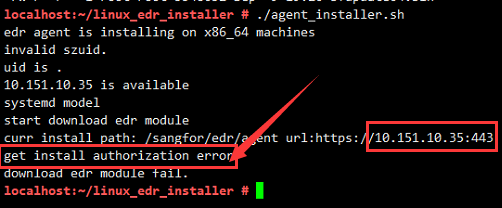
[ES] Installation of agent in linux environment prompts “get install authorization error”.
Problem Description
linux environment installation agent prompts get install authorization error
Alarm Information
Effective Troubleshooting Steps
- According to the error message, it is determined that it is an authorization error.
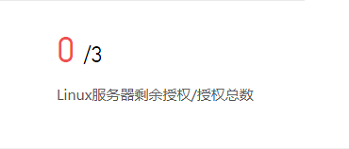
- Log in to ES Manager to confirm and find that there are no remaining Linux server licenses available on ES Manager, as shown in the following image:
3. By releasing the authorization, reinstalling normally.
Solution
There are no remaining Linux server licenses on ES Manager, release the license and reinstall normally.
Original Link
https://support.sangfor.com.cn/cases/list?product_id=16&type=1&category_id=2528&isOpen=true