
[ES] Insufficient account permissions on the management side result in the inability to search for Agent terminal information.
Problem Description
The Windows terminal displays that the connection to the management terminal is normal, but the ES management terminal cannot find the terminal information.
Effective Troubleshooting Steps
(1) Use the offline detection tool agent_check.rar for automatic detection.
https://support.sangfor.com.cn/cases/read?product_id=16&category_id=2635
(2) Locate the problem through Agent_Id and use cmd to query the current terminal's Agent_Id.
Input command:
cd / means change directory to the root directory.
cd "Program Files\Sangfor\ES\agent\var\log\ipcproxy0"
Type \* |findstr Id
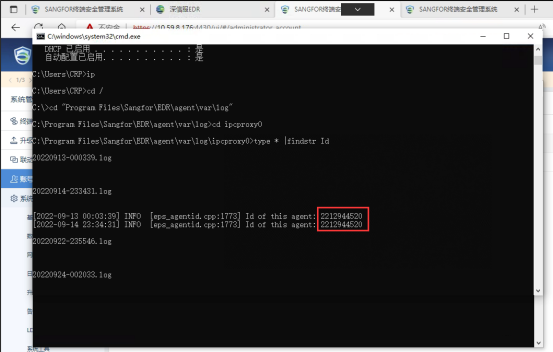
(3) Log in to the ES control panel – select terminal management – terminal group management – randomly select a terminal to enter and obtain the current URL.
(4) After obtaining the Agent_Id, concatenate the id of the URL obtained in step three and access it in the browser.
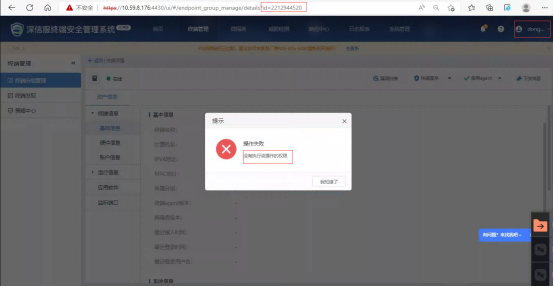
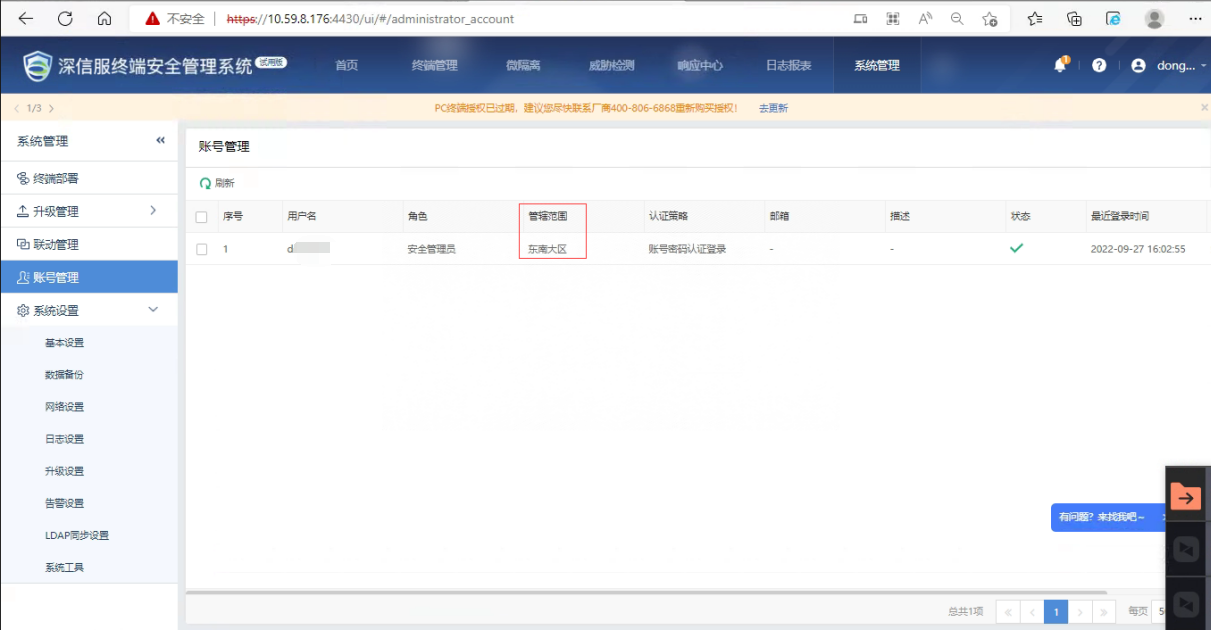
(5) Access prompt does not have permission to perform this operation. Check the username and permissions of the platform login account and find that the subordinate account can only manage the Southeast region. This Windows terminal is not in the Southeast region group, so the management end cannot search for the information of this terminal.
Root Cause
The subordinate unit account does not have sufficient permissions. The group where the Windows terminal is located is not within the scope of permissions for this subordinate unit, resulting in the customer being unable to find terminal information in the ES management console.
Solution
To move the Windows terminal to the subgroup of the lower-level unit, use the admin account.
Original Link
https://support.sangfor.com.cn/cases/list?product_id=16&type=1&category_id=2866&isOpen=true