
[ES] Linux agent offline issue caused by renaming the root account.
Problem Description
After installing the agent in the Linux environment, it shows as offline on the platform.
Effective Troubleshooting Steps
- Execute id root to determine if the root account exists.
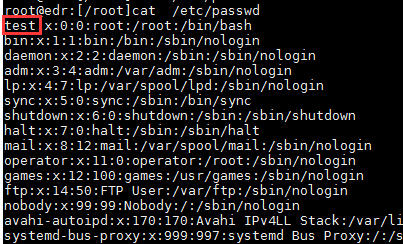
- Execute cat /etc/passwd to view the username of the user with the highest uid of 0; as shown in the example below, the account is test.
Root Cause
Renaming the root account caused the check script in the scheduled task to not execute, resulting in an offline issue.
Solution
Run vim /etc/cron.d/ES_agent to modify the file (for lower versions, it is /etc/cron.d/eps_agent), and change the root field to the corresponding user with uid 0. The location is shown in the following figure:

Original Link
https://support.sangfor.com.cn/cases/list?product_id=16&type=1&category_id=2549&isOpen=true