
[ES] Network card restart error caused by arp verification mechanism in Centos environment.
Problem Description
After configuring/modifying the network interface address on the newly deployed ES Manager platform, the network fails to restart and throws an error.
Solution
- The specific error message is thrown back by executing the command to modify the interface corresponding to ifup, as shown in the figure below. Taking the abnormal modification of the eth0 port configuration as an example, executing ifup eth0 will prompt the following error message:

- According to the error message, the error is due to the detection of another host already using the same address. After verifying and confirming that there is no address allocation conflict, you can resolve this by modifying the corresponding interface configuration (using eth0 as an example, by executing vi /etc/sysconfig/network-scripts/ifcfg-eth0 to modify the eth0 interface). At the end of the configuration, add the line ARPCHECK=no to skip the conflict check mechanism. The configuration is as follows:
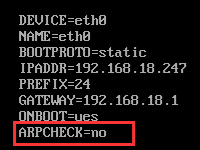
- Execute the "systemctl restart network" command to restart the network service and confirm that the restart is successful.
Original Link
https://support.sangfor.com.cn/cases/list?product_id=16&type=1&category_id=2599&isOpen=true