
[ES] Partial automatic upgrade is set to “No” for platform software upgrade.
Problem Description
The platform software's automatic upgrade section is not displayed.
Path: [System Management] – [Upgrade Management] – [Platform and Terminal Upgrade]
Alarm Information
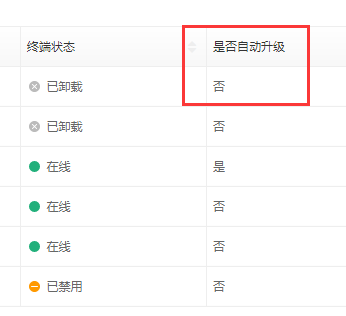
371535cd2b9e273e6a.png (11.38 KB)
Process –
- Check upgrade settings status.
Path: [System Management] – [System Settings] – [Upgrade Settings]
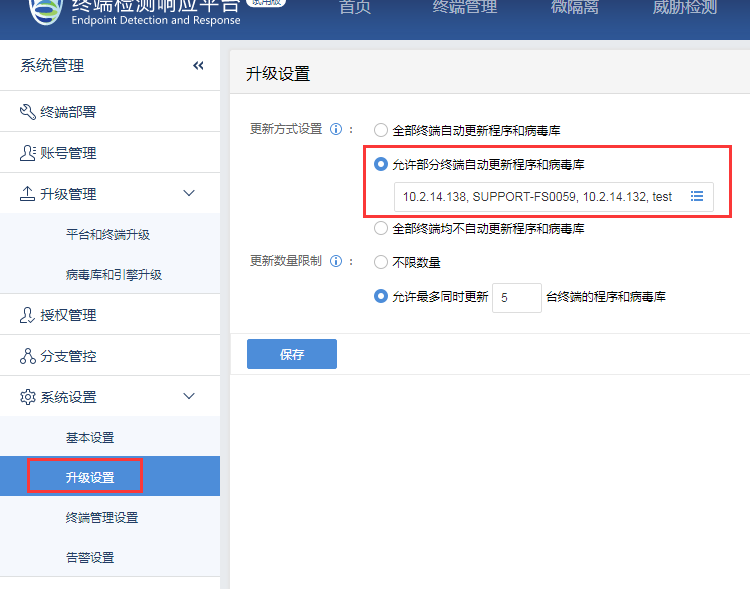
813485ca2bd25e93fb.png (62.67 KB)
Root Cause
select Agent and anti-virus database on some endpoints
Solution
Change the configuration to "Automatic update program and virus library for all terminals", and wait for 12 hours for ES Manager to automatically issue the upgrade.
Note: Running all terminals to update at the same time may occupy a large amount of ES Manager bandwidth and pose certain risks. It is recommended to limit the number of terminals updated simultaneously in the "Terminal Update Restrictions".
Original Link
https://support.sangfor.com.cn/cases/list?product_id=16&type=1&category_id=2483&isOpen=true